<?xml version="1.0" encoding="utf-8"?><feed xmlns="http://www.w3.org/2005/Atom" xml:lang="en-GB"><generator uri="https://jekyllrb.com/" version="3.10.0">Jekyll</generator><link href="https://nowcloud.pl/feed.xml" rel="self" type="application/atom+xml" /><link href="https://nowcloud.pl/" rel="alternate" type="text/html" hreflang="en-GB" /><updated>2026-05-29T05:19:03+00:00</updated><id>https://nowcloud.pl/feed.xml</id><title type="html">nowcloud.pl</title><subtitle>Azure platform architecture insights on landing zones, sovereign cloud, Azure Virtual Desktop, identity, security and infrastructure as code.</subtitle><author><name>Kamil Lygas</name></author><entry><title type="html">Private DNS at Scale in Azure Landing Zones</title><link href="https://nowcloud.pl/azure/networking/2026/05/29/private-dns-at-scale-in-azure-landing-zones.html" rel="alternate" type="text/html" title="Private DNS at Scale in Azure Landing Zones" /><published>2026-05-28T22:00:00+00:00</published><updated>2026-05-28T00:00:00+00:00</updated><id>https://nowcloud.pl/azure/networking/2026/05/29/private-dns-at-scale-in-azure-landing-zones</id><content type="html" xml:base="https://nowcloud.pl/azure/networking/2026/05/29/private-dns-at-scale-in-azure-landing-zones.html"><![CDATA[<p>Private endpoints are straightforward to demonstrate in one virtual network. Across many subscriptions, products, environments and connected networks, private DNS becomes one of the most important shared services in an Azure platform.</p>

<!--more-->

<h2 id="short-answer">Short answer</h2>

<p>Private DNS at Azure landing-zone scale is a shared platform capability that ensures private endpoint names resolve consistently from workload, hub and hybrid networks through centrally governed zones and resolution paths.</p>

<h2 id="series-context">Series context</h2>

<p>This is Part 2 of the <strong>Azure DNS for Landing Zones</strong> series.</p>

<ul>
  <li>Part 1: <a href="/azure/networking/2026/05/26/private-endpoints-need-private-dns-zones.html">Private Endpoints Need Private DNS Zones</a></li>
  <li>Part 2: Private DNS at Scale in Azure Landing Zones</li>
  <li>Part 3: Designing Pod-Based Global DNS for Azure Landing Zones - coming after that</li>
</ul>

<h2 id="architecture-decision">Architecture decision</h2>

<p>Centralise ownership of approved Azure Private DNS zones and resolver patterns, while enabling product teams to provision supported private endpoints through automated platform interfaces.</p>

<h2 id="when-to-use-this-pattern">When to use this pattern</h2>

<p>Use this pattern when private endpoints span multiple subscriptions or virtual networks, when hybrid systems must resolve Azure private services, or when consistent private connectivity is required for regulated workloads.</p>

<h2 id="why-private-dns-becomes-hard-at-scale">Why Private DNS Becomes Hard at Scale</h2>

<p>When an Azure service receives a private endpoint, applications still normally address the service using its familiar service hostname. DNS must guide that name to the private endpoint address from approved networks. In a small proof of concept, linking one private DNS zone to one virtual network can appear sufficient. In an enterprise platform, that approach quickly encounters ownership, duplication, hybrid resolution and lifecycle problems.</p>

<p>Product teams may create endpoints for storage, Key Vault, databases, container registries and other services in separate subscriptions. Environments may require isolation. On-premises systems may need to reach selected private services. Central networking teams need to understand the resulting paths without manually administering every application deployment.</p>

<p>Private DNS is therefore not just a network configuration detail. It is a platform capability that influences security boundaries, reliability and product-team autonomy.</p>

<blockquote>
  <p><strong>Architecture takeaway:</strong> Private DNS must be designed as a shared platform service once workloads consume private endpoints across subscriptions and networks.</p>
</blockquote>

<h2 id="private-endpoints-and-split-horizon-dns">Private Endpoints and Split-Horizon DNS</h2>

<p>A private endpoint maps an Azure service into a virtual network using a private IP address. Public DNS for the service continues to exist, while the private resolution path should return the endpoint address for clients that are intended to reach it privately. This is a split-horizon DNS problem: the correct answer depends on where the query originates and what access path is approved.</p>

<p>If name resolution is incorrect, clients may fail to connect, attempt a public path that policy prohibits, or reach the wrong endpoint arrangement. These failures are often misdiagnosed as firewall or application issues.</p>

<p>A platform design should treat endpoint provisioning and DNS registration as one capability. Creating a private endpoint without the intended resolution path is not a completed deployment.</p>

<h2 id="centralised-private-dns-zones">Centralised Private DNS Zones</h2>

<p>In a multi-subscription estate, Azure Private DNS zones are usually best owned centrally in a connectivity or shared-services subscription. Central ownership reduces duplicated zones, inconsistent records and uncertainty over which virtual networks are linked to which resolution source.</p>

<p>The platform can establish zones for approved Azure Private Link services and control zone links to the networks that require them. Product automation creates private endpoints and associates them with the supported central DNS pattern rather than creating arbitrary local zones.</p>

<p>Centralisation does not mean that the networking team must manually approve every routine endpoint. Terraform modules or deployment workflows can expose supported endpoint types and register them consistently. The division is useful: the platform owns resolution architecture, while the product owns its service instance and justified connectivity request.</p>

<blockquote>
  <p><strong>Architecture takeaway:</strong> Central ownership should be paired with automation, so consistent resolution does not become a manual delivery bottleneck.</p>
</blockquote>

<p>Environment separation requires deliberate thought. Some organizations use common central zones across environments where access and routing already provide adequate separation; others require stronger isolation. The decision should follow security and operational requirements rather than happen accidentally through portal defaults.</p>

<h2 id="private-dns-zone-sharding">Private DNS Zone Sharding</h2>

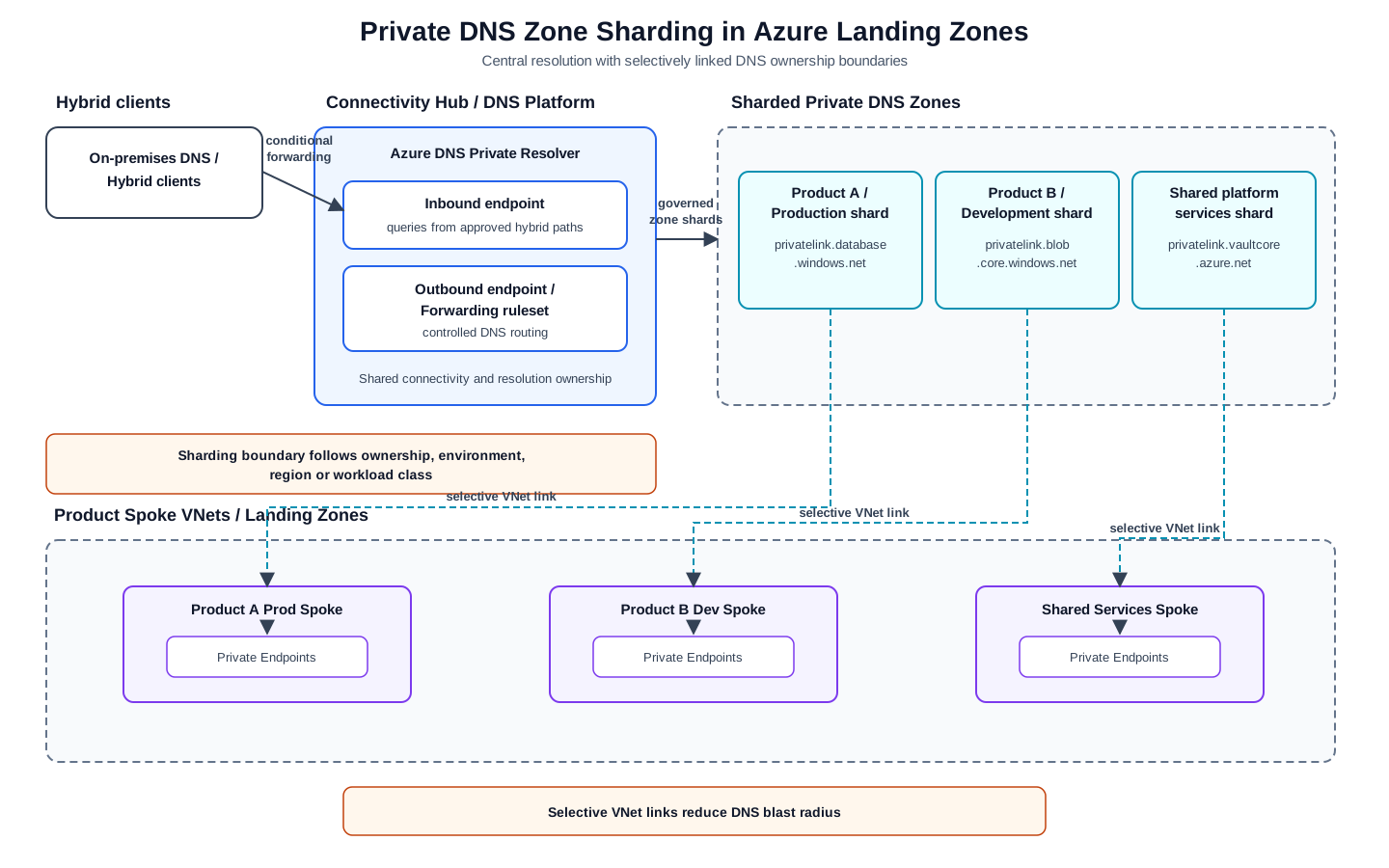
<p>Central ownership does not always require one flat zone shared across every product and environment. Private DNS zone sharding is an architecture pattern, not an Azure feature toggle: the platform deliberately establishes smaller resolution boundaries based on product or team ownership, environment, lifecycle, region, service type or workload class.</p>

<figure class="architecture-diagram">
  <img src="/assets/img/diagrams/private-dns-zone-sharding.svg" alt="Private DNS zone sharding pattern for Azure landing zones with Azure DNS Private Resolver, sharded private DNS zones, selective virtual network links and product spoke networks." />
  <figcaption>
    Private DNS zone sharding keeps central DNS governance while reducing change blast radius through selective virtual network links and ownership-based DNS boundaries.
  </figcaption>
</figure>

<p>Sharded zones are isolated by default, so cross-zone and hybrid resolution must be designed explicitly. Azure DNS Private Resolver supports hub-and-spoke and hybrid paths across approved DNS boundaries, while selective virtual network links limit which workloads consume each shard. Linking every spoke to every zone removes much of the operational isolation that sharding is intended to provide.</p>

<p>The same boundary should be reflected in Azure role-based access control (RBAC) and Azure Policy: teams should manage only the DNS scope they own, while platform governance retains central oversight. Avoid both extremes: one large flat zone for unrelated products and a proliferation of shards for short-lived workloads without a durable operational reason.</p>

<p>This pattern can improve operational resiliency and change safety by containing the impact of record or link changes. It does not change the underlying availability commitment of the Azure DNS service.</p>

<blockquote>
  <p>Architecture takeaway: Use sharding when DNS ownership, change blast radius or environment isolation becomes more important than the simplicity of a single flat private DNS zone.</p>
</blockquote>

<h2 id="hub-and-spoke-considerations">Hub-and-Spoke Considerations</h2>

<p>Hub-and-spoke landing zones frequently place shared DNS capability in, or reachable from, the hub while workloads deploy in spoke virtual networks. DNS resolution must function from spokes and from any hybrid-connected network permitted to access services.</p>

<p>Virtual network links, routing, DNS server settings and firewall behavior need consistent design. A workload spoke should not need its own ad hoc DNS server simply because a private endpoint was created. Equally, central DNS services need sufficient availability and monitoring because a resolution outage can affect many products at once.</p>

<p>When workloads are segmented or have different regulatory boundaries, link and forwarding design should reflect those boundaries. Central service does not justify unnecessary cross-workload reachability.</p>

<h2 id="centralised-private-dns-with-azure-firewall-dns-proxy">Centralised Private DNS with Azure Firewall DNS Proxy</h2>

<p>In a classic hub-and-spoke landing zone, Azure Firewall DNS Proxy can be one central resolution path for spokes. A workload uses the firewall private IP as its DNS server; the firewall then forwards the query to an upstream DNS server that can resolve the centrally governed Private DNS zones.</p>

<div class="language-text highlighter-rouge"><div class="highlight"><pre class="highlight"><code>Spoke VM / workload
  -&gt; DNS query to Azure Firewall private IP
  -&gt; Azure Firewall DNS Proxy
  -&gt; upstream DNS with access to linked Private DNS zones
  -&gt; private A record / Private Endpoint IP
</code></pre></div></div>

<p>This can reduce the need to link every Private DNS zone to every spoke VNet, and it can keep the DNS answer used by clients aligned with DNS observed by firewall FQDN rules. The pattern is optional: the upstream DNS must resolve the required zones, and the spoke workloads must actually use the firewall proxy. DNS Proxy forwards queries; it does not make unlinked or unreachable private zones resolvable by itself.</p>

<p>For Azure Virtual WAN secured hubs, Private DNS zones cannot be linked directly to the Microsoft-managed virtual hub. A DNS extension VNet using Azure DNS Private Resolver or an approved forwarder pattern may be required. As with any central DNS dependency, availability, logging and operational ownership need explicit design.</p>

<blockquote>
  <p>Architecture takeaway: Azure Firewall DNS Proxy can reduce Private DNS zone link sprawl by making spokes use a central DNS path, but only when the firewall’s upstream resolver can actually resolve the linked Private DNS zones.</p>
</blockquote>

<h2 id="azure-dns-private-resolver">Azure DNS Private Resolver</h2>

<p>Azure DNS Private Resolver provides managed inbound and outbound endpoints and forwarding rulesets for hybrid name-resolution patterns, reducing the need to operate custom DNS forwarder virtual machines for many scenarios.</p>

<p>An inbound endpoint enables connected networks to send DNS queries into Azure for names that Azure can resolve, including private zones exposed through the intended design. An outbound endpoint and forwarding rulesets allow Azure workloads to resolve specified domains through destinations such as enterprise DNS services.</p>

<p>The resolver belongs in the connectivity architecture: subnets, regional resilience, routing, forwarding rules, diagnostic needs and ownership must be planned. It is not merely a convenience feature added individually by each workload team.</p>

<blockquote>
  <p><strong>Architecture takeaway:</strong> Name resolution is an operational dependency; resolver resilience, monitoring and ownership belong in architecture decisions.</p>
</blockquote>

<h2 id="conditional-forwarding-from-on-premises">Conditional Forwarding from On-Premises</h2>

<p>Hybrid applications often require on-premises clients or servers to reach Azure services through private endpoints. Enterprise DNS servers can conditionally forward the appropriate Azure private-resolution queries toward Azure DNS Private Resolver inbound endpoints or another approved Azure resolution path.</p>

<p>The exact forwarding model must be documented and tested. Overly broad forwarding can create unexpected dependency or resolution behavior; incomplete forwarding creates intermittent failures depending on where clients operate. Include disaster recovery and secondary-region behavior in the design rather than addressing it only during an outage.</p>

<p>Operational troubleshooting should allow support teams to answer: which DNS server responded, which zone or rule applied, which private IP was returned and whether that IP is reachable from the requesting network.</p>

<h2 id="product-and-platform-ownership-model">Product and Platform Ownership Model</h2>

<p>Clear responsibility avoids both uncontrolled sprawl and slow manual delivery:</p>

<ul>
  <li>The platform team owns DNS architecture, approved private endpoint patterns, central zones, resolver capability, forwarding policy and monitoring.</li>
  <li>Product teams own their services, data-access decisions, endpoint requests and validation of application connectivity.</li>
  <li>Security and governance teams define public-access restrictions, evidence expectations and exception review.</li>
  <li>Operations teams need runbooks for DNS resolution failures, endpoint lifecycle and regional recovery.</li>
</ul>

<p>This model can be implemented through a documented module catalogue. A module request may include service type, environment, spoke network, DNS association and ownership metadata, then deploy the endpoint according to the approved platform pattern.</p>

<h2 id="common-failure-modes">Common failure modes</h2>

<p>Frequent causes of trouble include:</p>

<ul>
  <li>Product subscriptions creating duplicate private DNS zones for the same Azure service.</li>
  <li>Large flat zones shared by too many products, making routine DNS changes unnecessarily risky.</li>
  <li>Over-sharding zones for short-lived workloads, creating avoidable operational overhead.</li>
  <li>Linking too many virtual networks to too many zones, recreating a wide change blast radius.</li>
  <li>Sharded zones without a documented cross-zone or hybrid resolution path.</li>
  <li>RBAC that does not match the intended ownership boundary of each DNS shard.</li>
  <li>Missing virtual-network links, causing Azure-hosted clients to receive public answers or no useful answer.</li>
  <li>On-premises DNS without the required conditional forwarders.</li>
  <li>Private endpoint creation separated from DNS record lifecycle.</li>
  <li>Stale records after endpoints are replaced or deleted.</li>
  <li>DNS designs that do not account for disaster recovery or regional failure.</li>
  <li>Troubleshooting processes that check firewall rules without confirming resolution first.</li>
</ul>

<p>These failure modes are preventable when private DNS is treated as shared platform engineering.</p>

<h2 id="governance-and-naming">Governance and Naming</h2>

<p>Governance should define which Azure services are expected to use private access, who can create endpoint resources, how public network access is constrained and how DNS associations are made. Azure Policy and infrastructure as code can help prevent unsupported patterns and collect compliance evidence.</p>

<p>Naming and metadata make operations easier. Endpoint resources, associated network interfaces and requests should identify product, environment, region, service owner and support contact where standards allow. DNS zones themselves usually follow Azure service conventions, so management metadata and deployment records are essential context.</p>

<p>Diagnostics should be included for resolver components and relevant networking controls. Review DNS patterns when introducing a new Private Link service type, a new region or a new hybrid-connectivity route.</p>

<h2 id="architecture-checklist">Architecture checklist</h2>

<ul>
  <li>Private endpoint and DNS provisioning are delivered as one supported pattern.</li>
  <li>The design explicitly states whether Private DNS zones are flat, centralised or sharded.</li>
  <li>Sharding boundaries are based on ownership, environment, region, service type or lifecycle.</li>
  <li>RBAC and Azure Policy match the intended DNS ownership model.</li>
  <li>Virtual network links are selective and do not recreate a broad blast radius.</li>
  <li>Azure DNS Private Resolver is considered for cross-zone, hub-and-spoke or hybrid resolution.</li>
  <li>Zone size and record growth are monitored as operational signals.</li>
  <li>Central zone ownership and subscription placement are defined.</li>
  <li>Spoke network resolution and segmentation requirements are documented.</li>
  <li>Hybrid conditional forwarding has been tested from intended source networks.</li>
  <li>Azure DNS Private Resolver architecture includes resilience and ownership.</li>
  <li>Public access restrictions align with private-resolution expectations.</li>
  <li>Automation controls record creation and cleanup.</li>
  <li>Monitoring and troubleshooting runbooks include DNS-first verification.</li>
  <li>Recovery-region and regulated-boundary considerations are explicit.</li>
</ul>

<h2 id="further-reading">Further reading</h2>

<ul>
  <li><a href="/azure-networking/">Azure Networking</a></li>
  <li><a href="/azure-landing-zones/">Azure Landing Zones</a></li>
  <li><a href="https://learn.microsoft.com/en-us/azure/dns/dns-private-resolver-overview">Azure DNS Private Resolver documentation</a></li>
  <li><a href="https://learn.microsoft.com/en-us/azure/firewall/dns-settings">Azure Firewall DNS settings</a></li>
  <li><a href="https://learn.microsoft.com/en-us/azure/dns/sharding-private-dns-zones">Sharding private DNS zones - Azure DNS</a></li>
</ul>

<h2 id="related-architecture-notes">Related architecture notes</h2>

<ul>
  <li><a href="/azure/networking/2026/05/26/private-endpoints-need-private-dns-zones.html">Private Endpoints Need Private DNS Zones</a></li>
  <li><a href="/azure/landing-zones/2026/05/25/designing-azure-landing-zones-for-product-teams.html">Designing Azure Landing Zones for Product Teams</a></li>
  <li><a href="/infrastructure-as-code/">Infrastructure as Code</a></li>
  <li><a href="/sovereign-cloud/">Sovereign Cloud</a></li>
  <li>Designing Pod-Based Global DNS for Azure Landing Zones - coming after that.</li>
</ul>

<h2 id="summary">Summary</h2>

<p>Private DNS at scale is a foundational Azure landing-zone capability. Central zones, governed private endpoint integration, managed resolution paths and clear product/platform ownership allow enterprises to use private Azure services consistently without turning every connection into a bespoke network project. When DNS is designed as part of the platform, secure connectivity becomes more reliable, observable and easier for product teams to consume.</p>]]></content><author><name>Kamil Lygas</name></author><category term="Azure" /><category term="Networking" /><category term="Azure" /><category term="Private DNS" /><category term="Private Endpoints" /><category term="Azure Landing Zones" /><category term="Networking" /><summary type="html"><![CDATA[An architecture approach to Azure Private DNS, private endpoints and hybrid name resolution across enterprise landing zones.]]></summary><media:thumbnail xmlns:media="http://search.yahoo.com/mrss/" url="https://nowcloud.pl/assets/img/aboutfeature.jpg" /><media:content medium="image" url="https://nowcloud.pl/assets/img/aboutfeature.jpg" xmlns:media="http://search.yahoo.com/mrss/" /></entry><entry><title type="html">Private Endpoints Need Private DNS Zones</title><link href="https://nowcloud.pl/azure/networking/2026/05/26/private-endpoints-need-private-dns-zones.html" rel="alternate" type="text/html" title="Private Endpoints Need Private DNS Zones" /><published>2026-05-26T00:00:00+00:00</published><updated>2026-05-26T00:00:00+00:00</updated><id>https://nowcloud.pl/azure/networking/2026/05/26/private-endpoints-need-private-dns-zones</id><content type="html" xml:base="https://nowcloud.pl/azure/networking/2026/05/26/private-endpoints-need-private-dns-zones.html"><![CDATA[<p>Private connectivity is not complete when an endpoint resource exists in the portal. It is complete when the intended clients can resolve the service name correctly and use the private path reliably.</p>

<!--more-->

<h2 id="short-answer">Short answer</h2>

<p>When an app stops working, it is always DNS.</p>

<p>Except when it is networking.</p>

<p>Except in Azure, where it is often both - because somebody created a Private Endpoint and forgot that DNS is now part of the deployment.</p>

<p>A Private Endpoint is not a complete deployment until clients resolve the service name to the private endpoint IP from the networks that need to use it. In Azure landing zones, Private DNS zones, virtual network links and resolver paths are part of the architecture, not an optional afterthought.</p>

<p>Private Endpoint plus broken DNS is incomplete private connectivity. The resource may be provisioned successfully, and routing may be available, but an application that resolves the public path or cannot resolve the service at all will not consume the intended private endpoint.</p>

<h2 id="series-context">Series context</h2>

<p>This is Part 1 of the <strong>Azure DNS for Landing Zones</strong> series.</p>

<ul>
  <li>Part 1: Private Endpoints Need Private DNS Zones</li>
  <li>Part 2: Private DNS at Scale in Azure Landing Zones — publishing next</li>
  <li>Part 3: Designing Pod-Based Global DNS for Azure Landing Zones — coming after that</li>
</ul>

<p>Part 1 focuses on the smallest useful design decision: whenever a workload is expected to use a private endpoint, its name-resolution path must be designed and tested with the endpoint.</p>

<h2 id="the-mistake">The mistake</h2>

<p>The familiar sequence is deceptively simple:</p>

<ol>
  <li>A product team creates a private endpoint for an Azure service.</li>
  <li>The endpoint receives a private IP address in the workload network.</li>
  <li>Routing, network security and public-access settings appear correct.</li>
  <li>The application still cannot connect, or connects through a path that was not intended.</li>
</ol>

<p>The investigation often begins with firewalls, user-defined routes, private endpoint approval or application credentials. Those may matter, but the basic question should come first: what IP address does the application actually receive when it resolves the Azure service hostname?</p>

<p>The failure is often that DNS still returns an unsuitable public path, that the required Private DNS zone was never created or linked, or that a central resolver cannot see the private zone. Another common failure is a locally created zone in one subscription while workloads elsewhere use a different resolution path.</p>

<blockquote>
  <p><strong>The private endpoint changes the network path, but DNS decides whether the application uses that path.</strong></p>
</blockquote>

<p>This is why a private endpoint must not be treated as a stand-alone application resource. In a landing-zone architecture it consumes shared network and DNS capabilities.</p>

<h2 id="how-private-endpoint-dns-works">How Private Endpoint DNS works</h2>

<p>Applications usually continue to use an Azure service’s normal hostname. A storage client does not need a new bespoke application setting merely because a blob endpoint becomes private. Instead, Azure Private Link relies on DNS resolution producing the private endpoint path for networks that are allowed to use it.</p>

<p>For Blob Storage, the Microsoft-recommended Private DNS zone is:</p>

<div class="language-text highlighter-rouge"><div class="highlight"><pre class="highlight"><code>privatelink.blob.core.windows.net
</code></pre></div></div>

<p>The intended private-resolution sequence is:</p>

<div class="language-text highlighter-rouge"><div class="highlight"><pre class="highlight"><code>Application in product spoke VNet
  -&gt; resolves the storage service hostname
  -&gt; Private DNS resolution reaches privatelink.blob.core.windows.net
  -&gt; private A record returns 10.40.10.20
  -&gt; application connects to the private endpoint IP
</code></pre></div></div>

<p>The private A record maps the private-link service name to the endpoint network interface address. A private DNS zone group associated with the private endpoint can manage the relevant record association when it is configured against the correct zone.</p>

<p>The details matter:</p>

<ul>
  <li>The public Azure service FQDN may remain the application-facing name.</li>
  <li>The recommended <code class="language-plaintext highlighter-rouge">privatelink.*</code> zone supports correct private endpoint resolution for that service type.</li>
  <li>A VNet linked to the Private DNS zone can resolve records in the zone when it uses the Azure-provided DNS path.</li>
  <li>A network using custom DNS, central forwarding or hybrid connectivity needs an approved resolver path to the linked zone.</li>
  <li>Public DNS and Azure Private DNS are different control planes. A public service name does not make a private record visible, and a private zone is not published to the internet.</li>
</ul>

<p>Do not invent a custom substitute for the service’s required <code class="language-plaintext highlighter-rouge">privatelink.*</code> zone simply to make the naming look tidy. Custom application aliases can be useful at another layer, but the platform still needs the Azure Private Endpoint DNS integration required by the service.</p>

<h2 id="what-the-platform-should-own">What the platform should own</h2>

<p>At enterprise scale, individual workload teams should not each decide how Azure Private Link DNS works. The platform team should own or govern the reusable resolution capability:</p>

<ul>
  <li>Approved <code class="language-plaintext highlighter-rouge">privatelink.*</code> Private DNS zones for supported Azure service types.</li>
  <li>A central DNS resource group or subscription where central ownership is appropriate.</li>
  <li>The virtual network link strategy: which hub, spoke or resolution VNets can query each zone.</li>
  <li>Azure DNS Private Resolver and hybrid forwarding paths where workloads or on-premises networks need them.</li>
  <li>Policy and deployment guardrails that prevent unsupported DNS patterns.</li>
  <li>Naming, RBAC and ownership metadata for platform DNS resources.</li>
  <li>Cleanup processes so deleted or replaced private endpoints do not leave stale private records.</li>
</ul>

<p>Central ownership does not mean a manual ticket for every endpoint. The preferred model is a supported infrastructure-as-code module or deployment workflow that allows a product team to request a private endpoint while the platform pattern supplies the approved DNS association.</p>

<p>Where a shared connectivity hub provides DNS resolution, Private DNS zones may be linked to the hub or other approved resolution VNet. Spoke and hybrid clients then reach the private answer through the documented resolver path. The design should make that path visible to support teams and testable from workloads.</p>

<h2 id="what-the-product-team-should-own">What the product team should own</h2>

<p>The application or product team remains accountable for why private connectivity is required and whether the application actually works through it. It should own:</p>

<ul>
  <li>The justified request for a private endpoint.</li>
  <li>The Azure service instance consumed by the application.</li>
  <li>The workload connectivity requirement and permitted source networks.</li>
  <li>Application connection configuration and secret handling.</li>
  <li>Testing name resolution and connectivity from the workload network.</li>
  <li>A lifecycle or decommissioning request when the endpoint is no longer needed.</li>
</ul>

<p>This separation avoids two poor outcomes: unrestricted DNS sprawl in product subscriptions and a platform team that becomes responsible for application behavior it cannot validate.</p>

<h2 id="minimal-implementation-pattern">Minimal implementation pattern</h2>

<p>Consider a generic product workload that accesses a storage account through Blob Storage:</p>

<table>
  <thead>
    <tr>
      <th>Item</th>
      <th>Example</th>
    </tr>
  </thead>
  <tbody>
    <tr>
      <td>Azure service</td>
      <td>Storage account Blob endpoint</td>
    </tr>
    <tr>
      <td>Required Private DNS zone</td>
      <td><code class="language-plaintext highlighter-rouge">privatelink.blob.core.windows.net</code></td>
    </tr>
    <tr>
      <td>Workload network</td>
      <td>Product spoke VNet</td>
    </tr>
    <tr>
      <td>Private endpoint IP</td>
      <td><code class="language-plaintext highlighter-rouge">10.40.10.20</code></td>
    </tr>
    <tr>
      <td>Platform DNS resource group</td>
      <td><code class="language-plaintext highlighter-rouge">rg-dns-private-platform</code></td>
    </tr>
    <tr>
      <td>Workload resource group</td>
      <td><code class="language-plaintext highlighter-rouge">rg-product-network</code></td>
    </tr>
  </tbody>
</table>

<p>This is a reference pattern rather than a complete production deployment. Subscription boundaries, access control, region, monitoring and infrastructure-as-code implementation should follow the platform standard.</p>

<h3 id="1-create-or-use-the-approved-private-zone">1. Create or use the approved private zone</h3>

<p>The platform either provisions this zone once for the supported service type or reuses the approved centrally governed zone:</p>

<div class="language-bash highlighter-rouge"><div class="highlight"><pre class="highlight"><code>az network private-dns zone create <span class="se">\</span>
  <span class="nt">--resource-group</span> rg-dns-private-platform <span class="se">\</span>
  <span class="nt">--name</span> privatelink.blob.core.windows.net
</code></pre></div></div>

<p>Avoid a separate copy of the same service zone in every product subscription unless the architecture deliberately requires isolated DNS boundaries and documents how clients select the correct zone.</p>

<h3 id="2-make-the-zone-resolvable-from-the-intended-network">2. Make the zone resolvable from the intended network</h3>

<p>For a direct spoke-resolution pattern, link the product spoke VNet to the zone without VM autoregistration:</p>

<div class="language-bash highlighter-rouge"><div class="highlight"><pre class="highlight"><code>az network private-dns <span class="nb">link </span>vnet create <span class="se">\</span>
  <span class="nt">--resource-group</span> rg-dns-private-platform <span class="se">\</span>
  <span class="nt">--zone-name</span> privatelink.blob.core.windows.net <span class="se">\</span>
  <span class="nt">--name</span> link-product-spoke-blob <span class="se">\</span>
  <span class="nt">--virtual-network</span> /subscriptions/&lt;subscription-id&gt;/resourceGroups/rg-product-network/providers/Microsoft.Network/virtualNetworks/vnet-product-spoke <span class="se">\</span>
  <span class="nt">--registration-enabled</span> <span class="nb">false</span>
</code></pre></div></div>

<p>This is a resolution link: the workload can query records in the private zone, while the link is not intended to register ordinary VM hostnames.</p>

<p>In a centrally resolved hub-and-spoke design, do not blindly link every zone to every spoke. Link zones and configure resolver paths according to the agreed model. If custom DNS or hybrid networks are involved, clients may need Azure DNS Private Resolver inbound endpoints and conditional forwarding rather than a direct spoke link.</p>

<h3 id="3-associate-the-endpoint-with-the-private-dns-zone">3. Associate the endpoint with the private DNS zone</h3>

<p>After the product’s private endpoint has been created, associate it with the approved zone through a private DNS zone group:</p>

<div class="language-bash highlighter-rouge"><div class="highlight"><pre class="highlight"><code>az network private-endpoint dns-zone-group create <span class="se">\</span>
  <span class="nt">--resource-group</span> rg-product-network <span class="se">\</span>
  <span class="nt">--endpoint-name</span> pe-product-blob <span class="se">\</span>
  <span class="nt">--name</span> default <span class="se">\</span>
  <span class="nt">--private-dns-zone</span> /subscriptions/&lt;platform-subscription-id&gt;/resourceGroups/rg-dns-private-platform/providers/Microsoft.Network/privateDnsZones/privatelink.blob.core.windows.net <span class="se">\</span>
  <span class="nt">--zone-name</span> blob
</code></pre></div></div>

<p>The DNS zone group is the integration point between the endpoint and the platform-owned zone. The platform workflow should ensure that the endpoint type is paired with the correct recommended zone, rather than asking product teams to guess the mapping.</p>

<p>For the example endpoint, the private zone should contain the private record associated with <code class="language-plaintext highlighter-rouge">10.40.10.20</code>. In a managed deployment this record is produced through the zone-group association; manually entered records should be reserved for carefully governed cases where automation is not suitable.</p>

<h3 id="4-verify-resolution-from-the-workload-network">4. Verify resolution from the workload network</h3>

<p>Run the test from a compute resource that uses the same DNS path as the application, not only from an administrator workstation:</p>

<div class="language-bash highlighter-rouge"><div class="highlight"><pre class="highlight"><code>nslookup &lt;storage-account-name&gt;.blob.core.windows.net
</code></pre></div></div>

<p>The result should lead to the intended private endpoint address:</p>

<div class="language-text highlighter-rouge"><div class="highlight"><pre class="highlight"><code>Name:    &lt;storage-account-name&gt;.privatelink.blob.core.windows.net
Address: 10.40.10.20
</code></pre></div></div>

<p>Also test the application connection, public-access policy behavior and any hybrid source networks that are expected to consume the private service. A successful private IP lookup confirms DNS behavior; it does not replace end-to-end connectivity testing.</p>

<h3 id="5-document-ownership-and-cleanup">5. Document ownership and cleanup</h3>

<p>For each endpoint, record:</p>

<ul>
  <li>Product or workload owner.</li>
  <li>Service type and required private DNS zone.</li>
  <li>Spoke or resolver path used for name resolution.</li>
  <li>Endpoint and DNS zone group resource ownership.</li>
  <li>Expected private IP or validation method.</li>
  <li>Removal process when the service is retired.</li>
</ul>

<p>Private endpoints have a lifecycle. DNS associations and stale records must be removed when endpoints are replaced or deleted, or troubleshooting becomes harder and name resolution can become misleading.</p>

<h2 id="resolver-paths-in-hub-and-spoke-landing-zones">Resolver paths in hub-and-spoke landing zones</h2>

<p>A small Azure-only deployment may work with a Private DNS zone linked directly to one spoke VNet. Enterprise landing zones often need a broader pattern:</p>

<div class="language-text highlighter-rouge"><div class="highlight"><pre class="highlight"><code>Product spoke VNet
  -&gt; approved Azure DNS resolution path
  -&gt; Private DNS zone linked to resolution VNet
  -&gt; private endpoint record

On-premises client
  -&gt; enterprise DNS conditional forwarder
  -&gt; Azure DNS Private Resolver inbound endpoint
  -&gt; Private DNS zone linked in Azure
  -&gt; private endpoint record
</code></pre></div></div>

<p>Azure DNS Private Resolver supplies managed inbound and outbound endpoints and forwarding rulesets. An inbound endpoint enables connected networks to query Azure private zones through a controlled Azure path. An outbound endpoint and linked ruleset enable Azure networks to forward selected namespaces to approved DNS servers elsewhere.</p>

<p>This does not remove design responsibility. The platform must decide where the resolver is deployed, which networks can reach it, which zones are linked, how forwarding is monitored and how a secondary region or recovery scenario behaves.</p>

<h2 id="centralised-private-dns-with-azure-firewall-dns-proxy">Centralised Private DNS with Azure Firewall DNS Proxy</h2>

<p>A Private Endpoint DNS design does not always require linking the <code class="language-plaintext highlighter-rouge">privatelink.*</code> zone to every spoke VNet. In a classic hub-and-spoke Azure landing zone, one option is to link required Private DNS zones to the hub or DNS platform VNet, configure Azure Firewall as a DNS proxy, and configure spoke VNets to use the Azure Firewall private IP address as their DNS server.</p>

<p>Azure Firewall DNS Proxy acts as an intermediary. A spoke workload sends a DNS query to the firewall private IP, and the firewall forwards that query to its configured upstream DNS server. When the upstream path can resolve the platform-owned Private DNS zones, the product spoke receives the private endpoint answer through one centrally governed DNS path.</p>

<p>Instead of making every spoke a direct resolution link:</p>

<div class="language-text highlighter-rouge"><div class="highlight"><pre class="highlight"><code>Private DNS zone
  -&gt; linked to every spoke VNet
</code></pre></div></div>

<p>The platform can use this pattern where appropriate:</p>

<div class="language-text highlighter-rouge"><div class="highlight"><pre class="highlight"><code>Spoke VM / workload
  -&gt; DNS query to Azure Firewall private IP
  -&gt; Azure Firewall DNS Proxy
  -&gt; upstream DNS that can resolve Azure Private DNS zones
  -&gt; private A record / Private Endpoint IP
</code></pre></div></div>

<p>This option can reduce Private DNS zone virtual network link sprawl, maintain a consistent DNS view between Azure Firewall FQDN rules and clients, simplify platform governance and reduce the temptation for workload subscriptions to create duplicate private zones.</p>

<p>It is not a universal rule. The following constraints are important:</p>

<ul>
  <li>Spoke workloads must actually use the Azure Firewall private IP as their DNS server.</li>
  <li>The upstream DNS configured on Azure Firewall must be able to resolve the required Private DNS zones.</li>
  <li>When Azure Firewall uses Azure-provided DNS upstream, the required zone must be linked to the VNet context from which that Azure DNS query can resolve it.</li>
  <li>When Azure Firewall uses a custom DNS server upstream, that server must resolve or correctly forward queries toward the Azure Private DNS zones.</li>
  <li>DNS Proxy does not combine every zone in the tenant. It forwards each client query to the configured upstream DNS path.</li>
  <li>In an Azure Virtual WAN secured hub design, Microsoft-managed secured virtual hubs cannot be linked directly to Private DNS zones. A DNS extension VNet with a resolver or forwarder pattern may be required.</li>
  <li>This design centralises DNS dependency on the hub and firewall path, so availability, logging, operations and recovery ownership must be planned.</li>
</ul>

<blockquote>
  <p>Architecture takeaway: Azure Firewall DNS Proxy can reduce Private DNS zone link sprawl by making spokes use a central DNS path, but only when the firewall’s upstream resolver can actually resolve the linked Private DNS zones.</p>
</blockquote>

<h3 id="azure-firewall-dns-proxy-implementation-pattern">Azure Firewall DNS Proxy implementation pattern</h3>

<ol>
  <li>Enable DNS Proxy on Azure Firewall.</li>
  <li>Configure spoke VNet DNS servers to use the Azure Firewall private IP.</li>
  <li>Link required Azure Private DNS zones to the hub or DNS platform VNet.</li>
  <li>Ensure Azure Firewall upstream DNS can resolve those zones.</li>
  <li>Restart or renew DNS configuration on VMs after VNet DNS server changes.</li>
  <li>Verify resolution from a workload VM in a spoke VNet.</li>
</ol>

<p>The firewall-side configuration is intentionally concise:</p>

<div class="language-bash highlighter-rouge"><div class="highlight"><pre class="highlight"><code>az network firewall update <span class="se">\</span>
  <span class="nt">--name</span> &lt;firewall-name&gt; <span class="se">\</span>
  <span class="nt">--resource-group</span> &lt;firewall-rg&gt; <span class="se">\</span>
  <span class="nt">--enable-dns-proxy</span> <span class="nb">true</span>
</code></pre></div></div>

<p>Configure the spoke VNet to send DNS queries to the firewall private IP:</p>

<div class="language-bash highlighter-rouge"><div class="highlight"><pre class="highlight"><code>az network vnet update <span class="se">\</span>
  <span class="nt">--name</span> vnet-product-spoke <span class="se">\</span>
  <span class="nt">--resource-group</span> rg-product-network <span class="se">\</span>
  <span class="nt">--dns-servers</span> &lt;azure-firewall-private-ip&gt;
</code></pre></div></div>

<p>After the VNet DNS setting is updated, renew the guest network configuration or restart test VMs as required, then validate the storage lookup from the spoke:</p>

<div class="language-bash highlighter-rouge"><div class="highlight"><pre class="highlight"><code>nslookup &lt;storage-account-name&gt;.blob.core.windows.net
</code></pre></div></div>

<p>The expected answer remains the private endpoint address, such as <code class="language-plaintext highlighter-rouge">10.40.10.20</code>. The difference is that the client reaches that answer through Azure Firewall DNS Proxy and its resolvable upstream path instead of through a direct zone link in every spoke.</p>

<h2 id="troubleshooting-order">Troubleshooting order</h2>

<p>When an application fails after private endpoint deployment, use an order that reflects the architecture:</p>

<ol>
  <li>Resolve the service hostname from the workload network.</li>
  <li>Confirm the answer is the intended private endpoint IP.</li>
  <li>Confirm the private DNS zone is the correct Microsoft-recommended zone for the service.</li>
  <li>Confirm the zone group and relevant VNet link or resolver path exist.</li>
  <li>Only then continue with routes, network security, firewall policy, service approval and application authentication.</li>
</ol>

<p>This order is not a claim that every outage is DNS. It is a way to avoid spending an hour inspecting a route table when the client never attempted to use the private address.</p>

<h2 id="common-failure-modes">Common failure modes</h2>

<ul>
  <li>A private endpoint is created without a DNS zone group.</li>
  <li>The wrong <code class="language-plaintext highlighter-rouge">privatelink.*</code> zone is selected for the service subresource.</li>
  <li>A product subscription creates an unmanaged duplicate private zone.</li>
  <li>The approved zone exists but is not visible through the workload’s VNet link or resolver path.</li>
  <li>Hybrid DNS is expected to resolve Azure private endpoints without conditional forwarding to Azure.</li>
  <li>A record remains after an endpoint is removed or replaced.</li>
  <li>Engineers validate the endpoint resource but do not test DNS from the application network.</li>
</ul>

<p>Each failure can be prevented through a platform module, policy checks, ownership records and a DNS-first validation step in release testing.</p>

<h2 id="architecture-checklist">Architecture checklist</h2>

<ul>
  <li>The private endpoint request includes the required DNS integration.</li>
  <li>The service uses the appropriate Microsoft-recommended <code class="language-plaintext highlighter-rouge">privatelink.*</code> zone.</li>
  <li>Zone ownership and RBAC are defined by the platform.</li>
  <li>The workload network can reach a linked-zone or resolver-based resolution path.</li>
  <li>Zone-group association is created and governed alongside the endpoint.</li>
  <li>Resolution is tested from the application network and any approved hybrid source.</li>
  <li>Cleanup is part of the endpoint lifecycle.</li>
  <li>Troubleshooting runbooks check resolution before deeper network diagnosis.</li>
</ul>

<h2 id="further-reading">Further reading</h2>

<ul>
  <li><a href="https://learn.microsoft.com/en-us/azure/private-link/private-endpoint-dns">Azure Private Endpoint DNS configuration</a></li>
  <li><a href="https://learn.microsoft.com/en-us/azure/private-link/private-endpoint-dns-integration">Azure Private Endpoint DNS integration scenarios</a></li>
  <li><a href="https://learn.microsoft.com/en-us/azure/dns/private-dns-virtual-network-links">Azure Private DNS virtual network links</a></li>
  <li><a href="https://learn.microsoft.com/en-us/azure/dns/private-resolver-endpoints-rulesets">Azure DNS Private Resolver endpoints and rulesets</a></li>
  <li><a href="https://learn.microsoft.com/en-us/azure/firewall/dns-settings">Azure Firewall DNS settings</a></li>
  <li><a href="https://learn.microsoft.com/en-us/azure/firewall/dns-details">Azure Firewall DNS Proxy details</a></li>
  <li><a href="https://learn.microsoft.com/en-us/azure/firewall-manager/private-link-inspection-secure-virtual-hub">Private endpoint inspection in an Azure Virtual WAN secured hub</a></li>
  <li><a href="https://learn.microsoft.com/en-us/cli/azure/network/private-endpoint/dns-zone-group">Azure CLI private endpoint DNS zone groups</a></li>
</ul>

<h2 id="related-architecture-notes">Related architecture notes</h2>

<ul>
  <li><a href="/azure-networking/">Azure Networking</a></li>
  <li>Private DNS at Scale in Azure Landing Zones — publishing next.</li>
  <li>Designing Pod-Based Global DNS for Azure Landing Zones - coming after that.</li>
</ul>

<h2 id="summary">Summary</h2>

<p>A Private Endpoint delivers a private network attachment, not a finished application connection. The finished pattern includes the approved Private DNS zone, the correct record association, a VNet link or resolver path and a test from the network where the application runs. Treating these elements as one platform capability is the difference between private connectivity that is repeatable and private connectivity that fails only after deployment.</p>]]></content><author><name>Kamil Lygas</name></author><category term="azure" /><category term="networking" /><category term="private-endpoint" /><category term="private-dns" /><category term="azure-dns" /><category term="azure-landing-zones" /><category term="platform-engineering" /><summary type="html"><![CDATA[A practical Azure landing zone note explaining why private endpoints are incomplete without correct Private DNS zones, VNet links and resolver paths.]]></summary><media:thumbnail xmlns:media="http://search.yahoo.com/mrss/" url="https://nowcloud.pl/assets/img/aboutfeature.jpg" /><media:content medium="image" url="https://nowcloud.pl/assets/img/aboutfeature.jpg" xmlns:media="http://search.yahoo.com/mrss/" /></entry><entry><title type="html">Designing Azure Landing Zones for Product Teams</title><link href="https://nowcloud.pl/azure/landing-zones/2026/05/25/designing-azure-landing-zones-for-product-teams.html" rel="alternate" type="text/html" title="Designing Azure Landing Zones for Product Teams" /><published>2026-05-25T00:00:00+00:00</published><updated>2026-05-25T00:00:00+00:00</updated><id>https://nowcloud.pl/azure/landing-zones/2026/05/25/designing-azure-landing-zones-for-product-teams</id><content type="html" xml:base="https://nowcloud.pl/azure/landing-zones/2026/05/25/designing-azure-landing-zones-for-product-teams.html"><![CDATA[<p>Azure product teams need a platform that removes repeated foundation decisions without removing accountability. An Azure landing zone should make secure delivery the normal path, not become a central queue for every subscription, network or policy change.</p>

<!--more-->

<h2 id="short-answer">Short answer</h2>

<p>Azure Landing Zones for product teams are governed platform foundations that standardise subscriptions, connectivity, identity, policy and observability while giving application teams a clear, automated route to deploy and operate their workloads.</p>

<h2 id="architecture-decision">Architecture decision</h2>

<p>Treat the landing zone as a versioned platform product owned around shared controls and supported patterns, while product teams retain responsibility for workload-specific architecture and operation.</p>

<h2 id="when-to-use-this-pattern">When to use this pattern</h2>

<p>Use this pattern when multiple products or environments require consistent Azure controls, when private connectivity and identity governance must scale beyond one project, or when regulated workloads require traceable policy and operational evidence.</p>

<h2 id="problem-statement">Problem Statement</h2>

<p>Enterprises rarely struggle to create a single Azure subscription. The harder problem is providing a repeatable environment for many products, stages and teams while retaining confidence in identity, connectivity, policy, monitoring, cost and regulatory boundaries.</p>

<p>Without a platform approach, projects make local decisions: one chooses its own private DNS arrangement, another assigns broad roles to a pipeline, and a third discovers logging or disaster recovery only before go-live. Those differences increase delivery effort and operational risk.</p>

<p>An Azure landing zone is the set of foundational decisions and automated capabilities that product teams consume. It should be opinionated where shared security and operations require consistency, and flexible where workload requirements genuinely differ.</p>

<blockquote>
  <p><strong>Architecture takeaway:</strong> A landing zone is a consumed platform capability, not only an initial subscription and network deployment.</p>
</blockquote>

<h2 id="platform-versus-project-mindset">Platform Versus Project Mindset</h2>

<p>A project mindset builds foundations for a delivery milestone. A platform mindset creates a supported product that must serve multiple workloads over time. The distinction affects priorities:</p>

<ul>
  <li>Reusable capability matters more than a one-off portal configuration.</li>
  <li>Clear consumer interfaces matter as much as the underlying Azure resource graph.</li>
  <li>Versioning, operational ownership and upgrade paths matter after initial deployment.</li>
  <li>Exceptions are design inputs to evaluate, not quiet divergence from standards.</li>
</ul>

<p>The platform team does not need to own every application resource. It should own the shared rules and building blocks that let application teams take appropriate responsibility for workloads.</p>

<h2 id="management-group-and-subscription-design">Management Group and Subscription Design</h2>

<p>Management groups provide a policy and access-assignment hierarchy. They should be designed around control requirements rather than copying an organizational chart that changes frequently. A common pattern distinguishes platform capabilities from workload landing zones and separates production from non-production or regulated scopes where the control baseline materially differs.</p>

<p>Subscriptions are useful boundaries for policy, access, quotas, billing visibility and blast radius. A product may receive distinct subscriptions for production and non-production, with additional boundaries where data sensitivity, connectivity or regulatory requirements demand them.</p>

<p>Subscription design should answer:</p>

<ul>
  <li>Who owns workload cost and operational response?</li>
  <li>Which baseline policies apply?</li>
  <li>Which deployment identities may create resources?</li>
  <li>Which networks and regions are available?</li>
  <li>How does a product transition from experimentation to production support?</li>
</ul>

<p>Over-fragmentation adds administration, while under-separation makes authorization and evidence difficult. The appropriate balance follows workload ownership and risk.</p>

<h2 id="subscription-vending">Subscription Vending</h2>

<p>Subscription vending converts architecture standards into an onboarding workflow. A request should capture product identity, environment, owner, support contact, data classification, connectivity need, region and budget information. Automation can then place the subscription in the correct management group and attach the platform baseline.</p>

<p>A vended subscription might receive:</p>

<ul>
  <li>Naming and tagging baseline.</li>
  <li>Role assignments for approved product and deployment groups.</li>
  <li>Budget and ownership information.</li>
  <li>Diagnostic settings and security integration.</li>
  <li>Network onboarding or documented connectivity choices.</li>
  <li>Policy assignments inherited through the intended scope.</li>
</ul>

<p>This process gives product teams a usable starting point and gives platform owners an auditable record of why an environment exists.</p>

<blockquote>
  <p><strong>Architecture takeaway:</strong> Subscription vending should establish ownership, controls and operational visibility at the moment a team receives its environment.</p>
</blockquote>

<h2 id="network-and-dns-baseline">Network and DNS Baseline</h2>

<p>Networking is where landing zones often succeed or fail in daily use. Product teams require predictable options for inbound access, outbound dependencies, hybrid connectivity and private Azure services. Hub-and-spoke or Azure Virtual WAN can provide shared connectivity and inspection, but the selected model must be supported with routing ownership and monitoring.</p>

<p>Private endpoints make private DNS a platform concern. If every team creates private DNS zones independently, resolution becomes unreliable across spokes and connected on-premises networks. A landing zone should define central private DNS zone ownership, zone-link behavior, Azure DNS Private Resolver or forwarding arrangements where needed, and automation for supported private endpoint types.</p>

<p>The baseline should be documented in consumer terms: how a product requests connectivity, what is centrally managed, which traffic is inspected and how incidents are diagnosed.</p>

<blockquote>
  <p><strong>Architecture takeaway:</strong> Private endpoint adoption makes DNS design and lifecycle automation part of the landing-zone product.</p>
</blockquote>

<h2 id="identity-and-role-assignment-model">Identity and Role Assignment Model</h2>

<p>Human and workload identities should be designed separately. Teams can receive access through Microsoft Entra ID groups with defined ownership and review. Privileged platform administration should be limited, monitored and eligible through controlled workflows where appropriate.</p>

<p>Deployment pipelines should use governed identities with only the permissions required for their deployment boundary. Avoid embedding long-lived secrets in product workflows where managed identities or workload identity federation provide a better control.</p>

<p>The landing zone also needs emergency access, role-change processes and an evidence path for audits or incidents. Least privilege is not a slogan; it is a maintained relationship between team responsibility and permitted action.</p>

<h2 id="azure-policy-baseline">Azure Policy Baseline</h2>

<p>Azure Policy turns selected standards into enforceable or measurable platform behavior. A baseline may require diagnostic settings, constrain locations, restrict insecure exposure, deploy supporting agents or report non-compliance. Policy should be treated as code: versioned, reviewed, tested, deployed progressively and associated with an exception process.</p>

<p>Do not begin with the maximum possible number of deny policies. A landing zone needs a baseline that prevents unacceptable outcomes while giving teams clear remediation. Audit and deploy-if-not-exists effects can establish visibility and configuration; deny effects should be intentional and understood by consumers.</p>

<p>Regulated workload scopes may add approved-service lists, restricted regions or more stringent connectivity requirements. Those additions should be traceable to a control need.</p>

<h2 id="observability-and-security-operations">Observability and Security Operations</h2>

<p>A subscription is not production-ready merely because deployment succeeds. Logs and platform metrics need defined destinations, retention and ownership. Security findings need operational routing. The platform should provide monitoring integration and product teams should understand which alerts they own.</p>

<p>Useful platform-level signals include policy compliance, subscription inventory, role assignment changes, network and firewall diagnostics, Defender recommendations, deployment failures and cost anomalies. Incident investigation is faster when those signals are consistent across products.</p>

<p>For sovereign or sensitive workloads, evidence collection and log data residency also require architecture review.</p>

<h2 id="product-team-onboarding">Product Team Onboarding</h2>

<p>Onboarding should include documentation, sample deployment code and a small number of decisions the product team genuinely owns. A team needs to know:</p>

<ul>
  <li>How to obtain subscriptions and deployment identities.</li>
  <li>How to consume network, DNS and private endpoint patterns.</li>
  <li>Which policies are applied and how to remediate or request an exception.</li>
  <li>Where logs, cost and security findings are visible.</li>
  <li>How platform changes and module versions are communicated.</li>
</ul>

<p>Platform support should observe repeated questions and use them to improve documentation, modules or automation rather than accepting permanent manual intervention.</p>

<h2 id="common-failure-modes">Common failure modes</h2>

<p>Common landing-zone failures include designing only for one initial workload, using management groups as a static organization chart, allowing uncontrolled private DNS creation, assigning excessive rights to deployment identities, applying policies without consumer guidance and treating operational monitoring as a later project phase.</p>

<p>Another mistake is presenting governance and developer experience as opposites. A well-designed platform creates fast, safe paths for standard delivery and a clear process for assessed exceptions.</p>

<h2 id="architecture-checklist">Architecture checklist</h2>

<ul>
  <li>Control requirements and workload classifications are understood.</li>
  <li>Management group scopes and subscription boundaries have clear purposes.</li>
  <li>Subscription vending attaches ownership, access, monitoring and policy consistently.</li>
  <li>Network, private endpoint and DNS patterns are documented and automated.</li>
  <li>Human and deployment identities follow least privilege.</li>
  <li>Policy is versioned, tested and linked to exception handling.</li>
  <li>Observability and security response have owners.</li>
  <li>Product onboarding is usable and measurable.</li>
  <li>Regulated requirements include evidence and recovery design.</li>
</ul>

<h2 id="further-reading">Further reading</h2>

<ul>
  <li><a href="/azure-landing-zones/">Azure Landing Zones</a></li>
  <li><a href="/infrastructure-as-code/">Infrastructure as Code</a></li>
  <li><a href="/azure-networking/">Azure Networking</a></li>
</ul>

<h2 id="related-architecture-notes">Related architecture notes</h2>

<ul>
  <li><a href="/azure/networking/2026/05/26/private-endpoints-need-private-dns-zones.html">Private Endpoints Need Private DNS Zones</a></li>
  <li><a href="/identity-security/">Identity &amp; Security</a></li>
  <li><a href="/platform-engineering/">Platform Engineering</a></li>
</ul>

<h2 id="summary">Summary</h2>

<p>Azure landing zones for product teams should be delivered as a platform product: a governed, automated foundation that reduces repeated architecture decisions and improves evidence, security and operational consistency. The best landing zone allows teams to focus on their product while knowing that identity, networking, policy and visibility are intentionally designed around them.</p>]]></content><author><name>Kamil Lygas</name></author><category term="Azure" /><category term="Landing Zones" /><category term="Azure" /><category term="Azure Landing Zones" /><category term="Platform Engineering" /><category term="Governance" /><category term="Terraform" /><summary type="html"><![CDATA[A platform architecture approach to Azure landing zones that gives product teams governed, repeatable cloud foundations.]]></summary><media:thumbnail xmlns:media="http://search.yahoo.com/mrss/" url="https://nowcloud.pl/assets/img/aboutfeature.jpg" /><media:content medium="image" url="https://nowcloud.pl/assets/img/aboutfeature.jpg" xmlns:media="http://search.yahoo.com/mrss/" /></entry><entry><title type="html">Configuring Infrastructure using Ansible</title><link href="https://nowcloud.pl/azure/automation/2023/03/26/Ansible.html" rel="alternate" type="text/html" title="Configuring Infrastructure using Ansible" /><published>2023-03-26T00:00:00+00:00</published><updated>2023-03-26T00:00:00+00:00</updated><id>https://nowcloud.pl/azure/automation/2023/03/26/Ansible</id><content type="html" xml:base="https://nowcloud.pl/azure/automation/2023/03/26/Ansible.html"><![CDATA[<p>Recently, I invested a lot of time into writing Terraform code to deploy a fairly complex infrastructure in Azure, which included a Virtual WAN, Firewall, Azure Front Door, and multiple virtual networks in two different regions, along with some VMs. While this was a time-consuming task, once all the Terraform modules were completed and working, I could deploy the entire infrastructure in almost no time and easily undeploy it once I was finished with my testing.</p>

<!--more-->

<p>However, I still needed to configure web servers, failover clusters for SQL Always On groups, and other elements. To accomplish this, I decided to explore Ansible.
Ansible is an open-source automation tool that allows IT professionals to automate tasks like configuration management, application deployment, and task automation. Ansible uses a simple, human-readable language called YAML to define tasks and configurations, and it can be easily integrated into existing workflows and toolchains.</p>

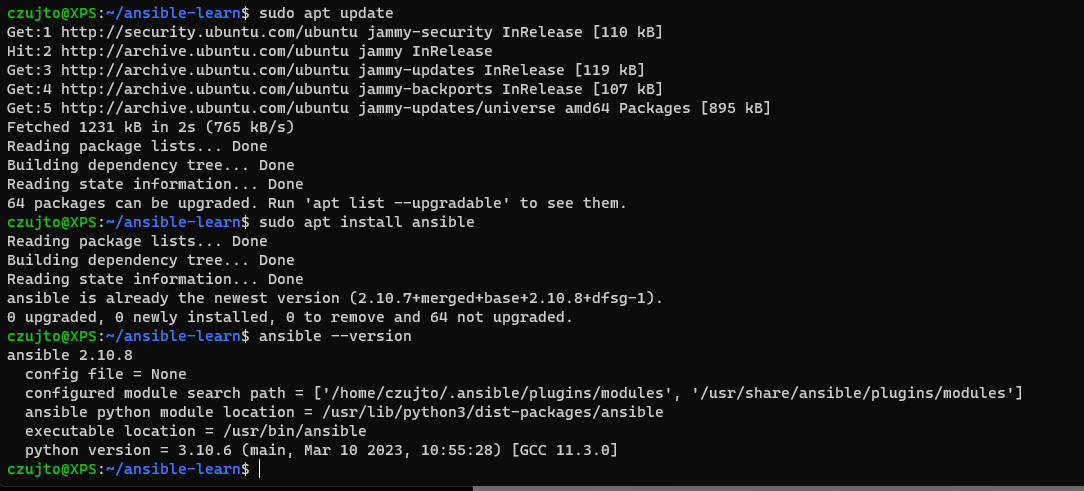
<p>In my current setup, I installed Ansible on my PC using WSL (Windows Subsystem for Linux) and Ubuntu. WSL is a compatibility layer in Windows that enables running Linux binaries natively on Windows. It provides a Linux-compatible kernel interface that allows Linux binaries to run on Windows without the need for a traditional virtual machine.
Installing Ansible on WSL and Ubuntu is fairly straightforward.</p>

<p><img src="/assets/img/blog/2023-03-26-Ansible/1.png" alt="Ansible" width="1200" height="600" /></p>

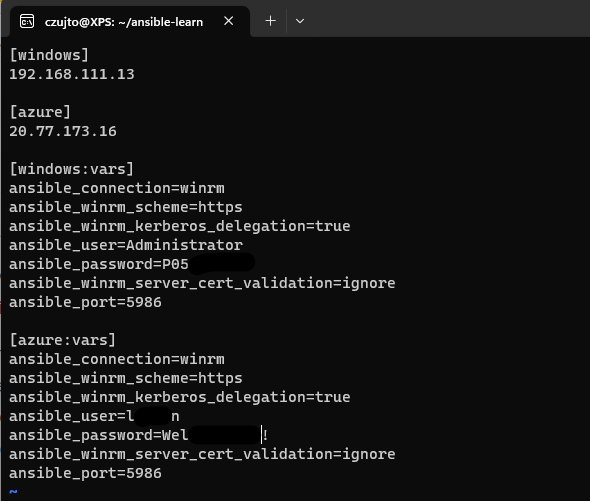
<p>After installing Ansible, I created a project folder and an inventory.txt file inside the project folder using the command
sudo vi inventory.txt
In the inventory.txt file, I added the hosts that I wanted to deploy my configuration, one is a VM running on my PC and one is a VM deployed in Azure with my Terraform code.
I divided the servers into two groups: [Window] and [azure]. You can add as many servers as you want to each of the groups.</p>

<p><img src="/assets/img/blog/2023-03-26-Ansible/2.png" alt="Ansible" width="1200" height="600" /></p>

<p>The next step was to configure a variable for each VM to allow communication between Ansible and Windows OS. It’s essential to remember that winrm must be configured on the Windows VM. You can run a PowerShell script to configure listeners and generate a self-signed certificate required for authentication. The PowerShell script can be found <a href="https://raw.githubusercontent.com/ansible/ansible/devel/examples/scripts/ConfigureRemotingForAnsible.ps1">here</a></p>

<p>For Azure VMs, I also had to configure NSGs and a Firewall to allow communication from my home PC on port 5986 used by Ansible.</p>

<p>Now, let’s create a playbook. An Ansible playbook is a collection of tasks that are executed against a set of hosts defined in an inventory file. Playbooks are written in YAML format and define the desired state of the hosts. Playbooks can be used for a wide range of automation tasks, including configuration management, application deployment, and task automation.</p>

<p>A playbook consists of one or more plays, and each play consists of a set of tasks to be executed on the hosts. Tasks are executed in order, and each task defines a module to be run on the host and the parameters for that module.</p>

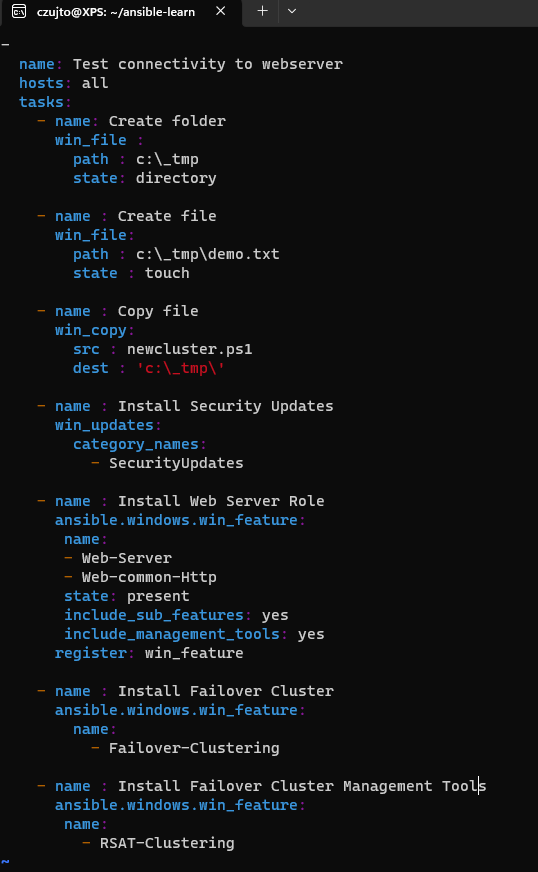
<p>In my playbook, I do a few things:</p>
<ul>
  <li>create a folder _tmp</li>
  <li>create a demo.txt file inside a folder that was created in the previous file</li>
  <li>copy PowerShell script that will create new failover cluster with a single node</li>
  <li>install Windows Security Updates</li>
  <li>install IIS on both VMs</li>
  <li>install Failover Cluster feature</li>
  <li>install Failover Cluster Management Tools</li>
</ul>

<p>Here is my playbook file pingtest.yaml</p>

<p><img src="/assets/img/blog/2023-03-26-Ansible/3.png" alt="Ansible" width="800" height="1200" /></p>

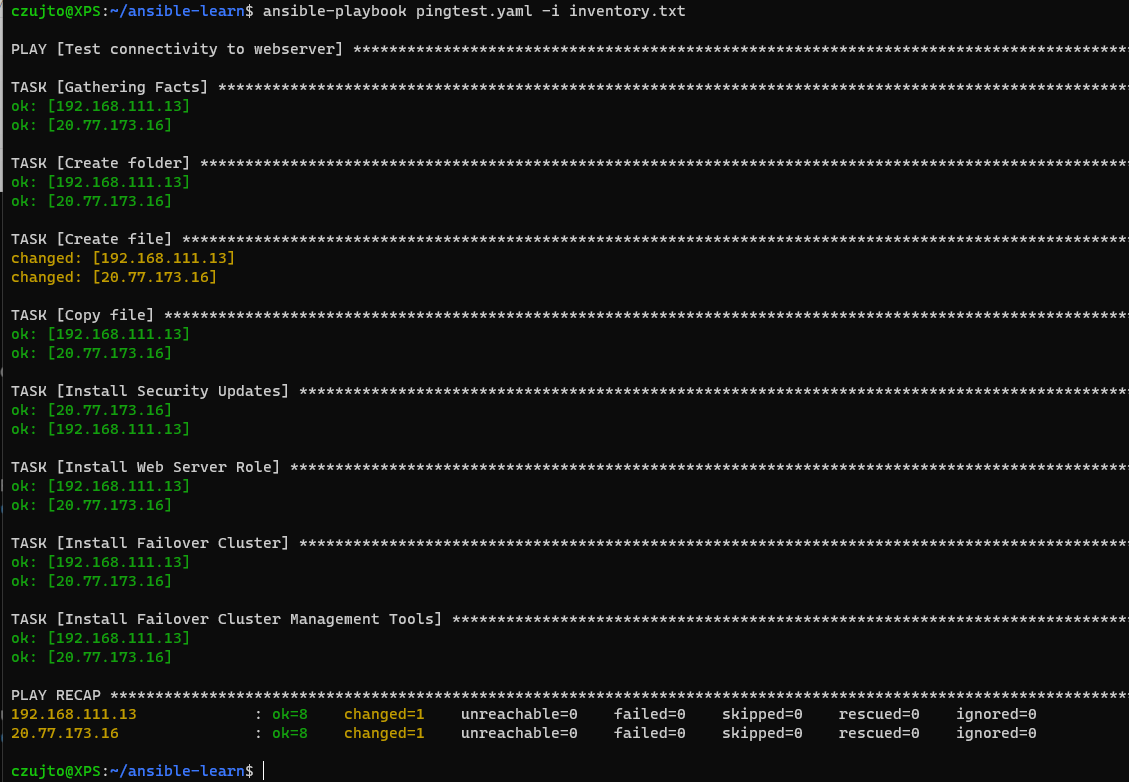
<p>Okay, now that we have everything configured, let’s run the playbook and see the end result. To execute a playbook, we run the below command:
 ansible-playbook pingtest.yaml -i inventory.txt</p>

<p><img src="/assets/img/blog/2023-03-26-Ansible/8.png" alt="Ansible" width="1200" height="600" /></p>

<p>Everything worked as expected (it didn’t straight away and it took me a good few hours to sort everything out 😂).</p>

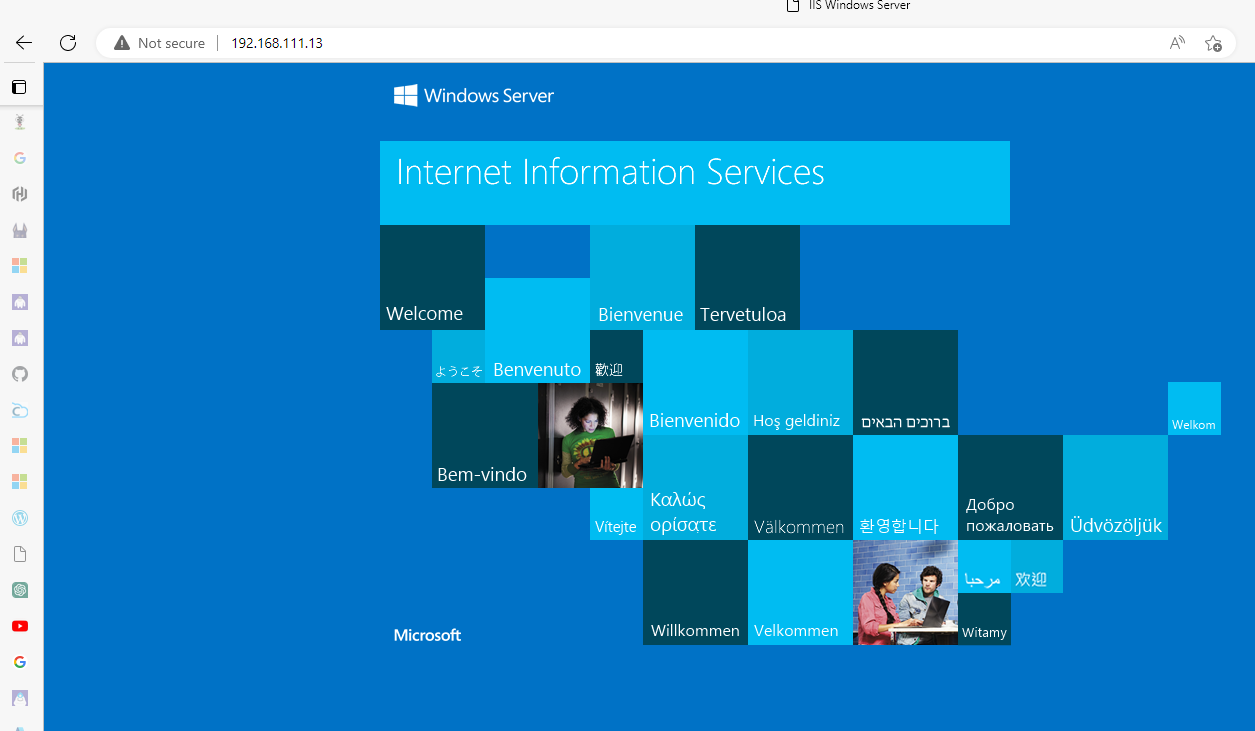
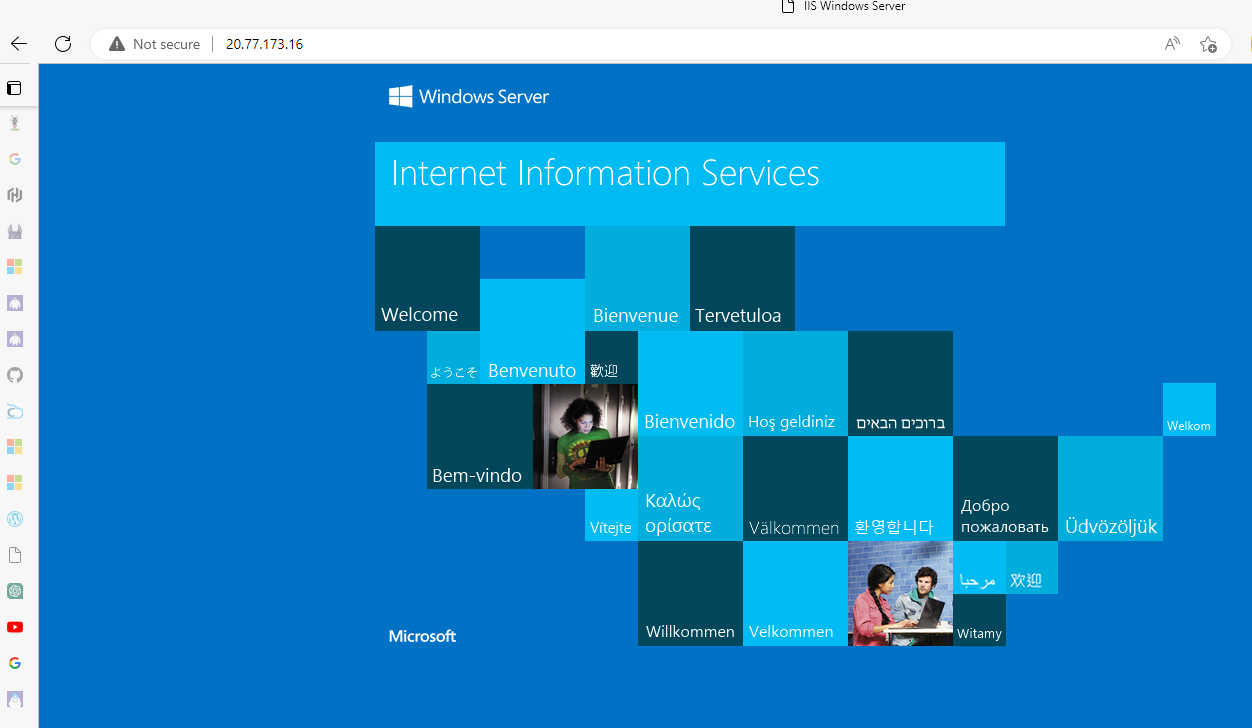
<p>Next, verify the IIS deployment:</p>

<p><img src="/assets/img/blog/2023-03-26-Ansible/5.png" alt="Ansible" width="1200" height="600" /></p>

<p><img src="/assets/img/blog/2023-03-26-Ansible/6.png" alt="Ansible" width="1200" height="600" /></p>

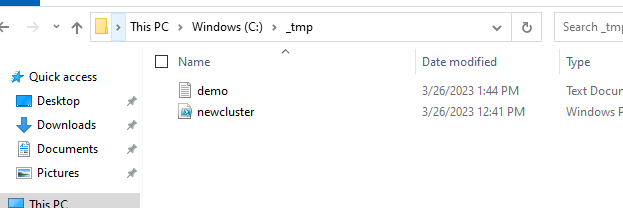
<p>As you can see, IIS has been successfully installed. What about Failover Cluster roles? Here they are too, with files and folders as well :)</p>

<p><img src="/assets/img/blog/2023-03-26-Ansible/7.png" alt="Ansible" width="1200" height="600" /></p>

<h2 id="summary">Summary</h2>

<p>This example used Terraform to provision Azure infrastructure and Ansible to configure Windows server roles after deployment. The combination is useful when responsibilities are clear: Terraform owns cloud resource state, while configuration automation manages operating-system configuration in a controlled, repeatable way.</p>

<p>Before production use, protect inventory secrets, restrict WinRM exposure, use appropriate authentication and certificate practices, test idempotency and include patching and rollback in the operating model. Automation is most valuable when it reduces drift and leaves a reviewable record of platform changes.</p>]]></content><author><name>Kamil Lygas</name></author><category term="Azure" /><category term="Automation" /><category term="Azure" /><category term="Terraform" /><category term="Ansible" /><category term="Automation" /><summary type="html"><![CDATA[Using Ansible after Terraform provisioning to configure Windows servers hosted in an Azure infrastructure.]]></summary><media:thumbnail xmlns:media="http://search.yahoo.com/mrss/" url="https://nowcloud.pl/assets/img/aboutfeature.jpg" /><media:content medium="image" url="https://nowcloud.pl/assets/img/aboutfeature.jpg" xmlns:media="http://search.yahoo.com/mrss/" /></entry><entry><title type="html">Building Tuck Shop application using Microsoft Power Apps</title><link href="https://nowcloud.pl/power%20platform/2023/03/25/TuckShop.html" rel="alternate" type="text/html" title="Building Tuck Shop application using Microsoft Power Apps" /><published>2023-03-25T00:00:00+00:00</published><updated>2023-03-25T00:00:00+00:00</updated><id>https://nowcloud.pl/power%20platform/2023/03/25/TuckShop</id><content type="html" xml:base="https://nowcloud.pl/power%20platform/2023/03/25/TuckShop.html"><![CDATA[<p>Microsoft Power Apps is a powerful low-code platform that allows users to create custom business applications with ease. Even if you have no experience in app development, Power Apps provides an intuitive interface that makes it easy to create fully functional applications quickly.</p>

<!--more-->

<p><img src="/assets/img/blog/2023-03-25-TuckShop/tuck1.png" alt="TuckShop" width="300" height="600" /></p>

<p>Recently, I had the opportunity to explore Power Apps and was amazed by its capabilities. One of the internal projects I worked on was creating a Tuck Shop app, which proved to be a fun and rewarding experience.</p>

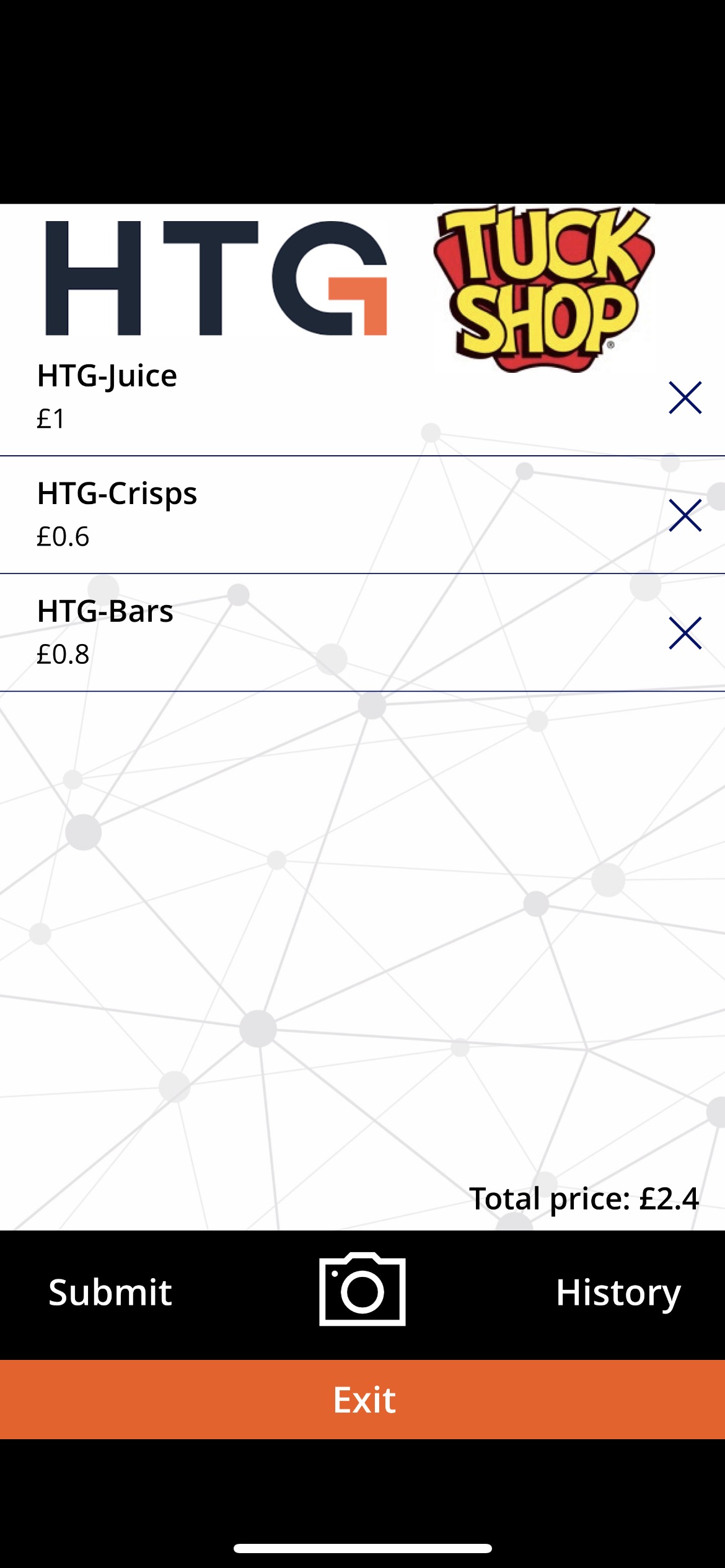
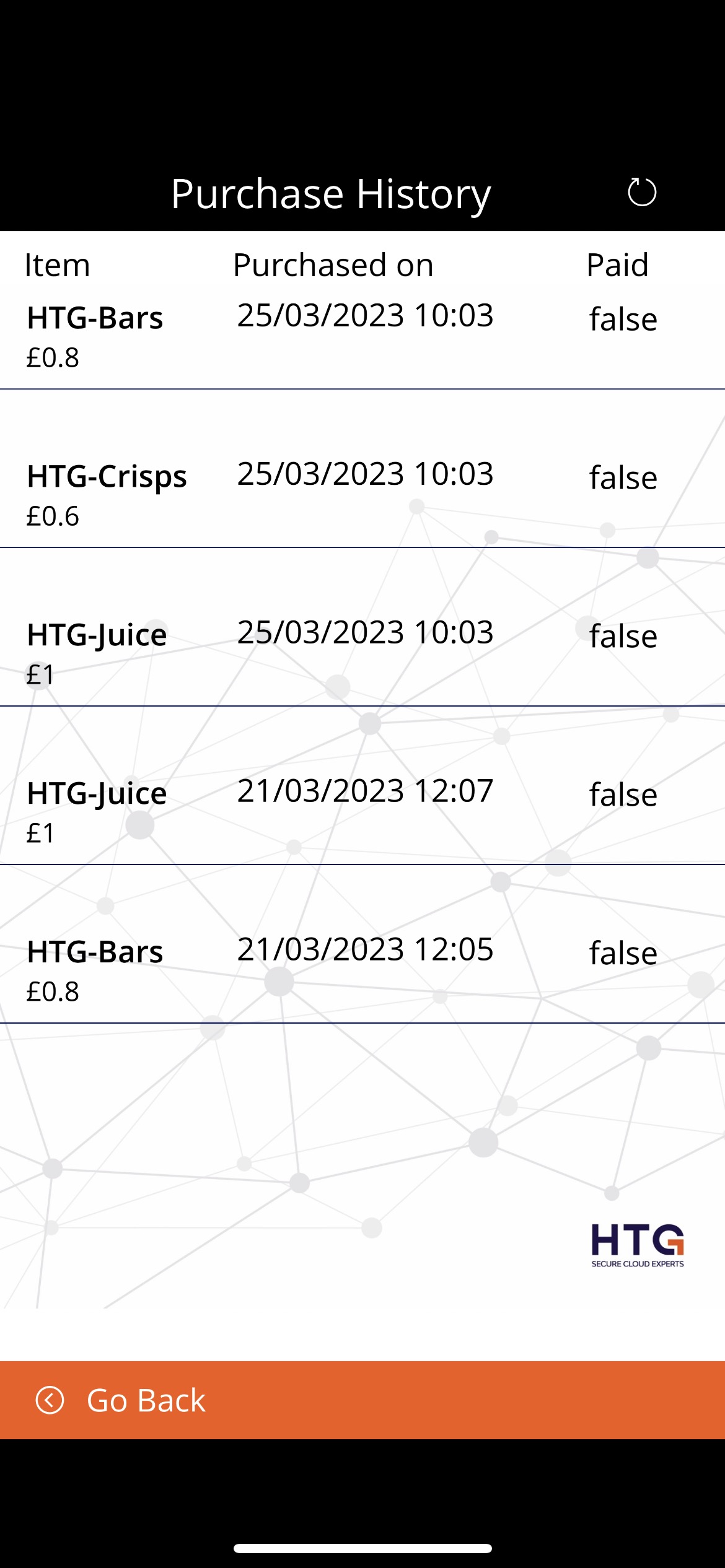
<p>The Tuck Shop app was designed to simplify the process of ordering snacks and drinks at HTG’s canteen. With Power Apps, I was able to create a user-friendly interface that allowed colleagues to scan the barcode of the items they wanted to purchase, view their total cost and purchase history, confirm whether an item was already paid for, and submit an order with just a few clicks.</p>

<p><img src="/assets/img/blog/2023-03-25-TuckShop/tuck2.png" alt="TuckShop" width="300" height="600" /></p>

<p>Power Apps made it easy to integrate the app with other Microsoft services such as SharePoint and Microsoft Teams. This meant that the app could be accessed by anyone with the right permissions, making it an ideal solution for managing purchases in the HTG Tuck Shop.</p>

<p>Overall, my experience with Power Apps was extremely positive. Its low-code platform allowed me to create a fully functional application without the need for extensive coding knowledge, and its seamless integration with other Microsoft services made it a versatile and efficient solution for the Tuck Shop project.</p>

<p>If you are looking for a powerful and user-friendly platform for creating custom business applications, Microsoft Power Apps is worth exploring. Its low-code approach, coupled with integration with other Microsoft services, makes it a useful tool for application development.</p>

<h2 id="summary">Summary</h2>

<p>This small application demonstrated how Power Apps, SharePoint and Teams can support a practical internal workflow with minimal custom development. For a production business application, the next architecture questions would include data ownership, access groups, audit requirements, environment strategy, support and application lifecycle governance.</p>]]></content><author><name>Kamil Lygas</name></author><category term="Power Platform" /><category term="Microsoft" /><category term="Power Apps" /><category term="SharePoint" /><category term="Teams" /><summary type="html"><![CDATA[A practical Microsoft Power Apps application for simplifying Tuck Shop ordering and purchase tracking.]]></summary><media:thumbnail xmlns:media="http://search.yahoo.com/mrss/" url="https://nowcloud.pl/assets/img/aboutfeature.jpg" /><media:content medium="image" url="https://nowcloud.pl/assets/img/aboutfeature.jpg" xmlns:media="http://search.yahoo.com/mrss/" /></entry><entry><title type="html">How to reset AVD Host Pool Counter</title><link href="https://nowcloud.pl/azure/virtual%20desktop/2021/06/24/AVDResetHostpoolCount.html" rel="alternate" type="text/html" title="How to reset AVD Host Pool Counter" /><published>2021-06-24T00:00:00+00:00</published><updated>2021-06-24T00:00:00+00:00</updated><id>https://nowcloud.pl/azure/virtual%20desktop/2021/06/24/AVDResetHostpoolCount</id><content type="html" xml:base="https://nowcloud.pl/azure/virtual%20desktop/2021/06/24/AVDResetHostpoolCount.html"><![CDATA[<p>This note shows how the starting virtual-machine number was adjusted when adding session hosts to an Azure Virtual Desktop host pool without removing existing hosts.</p>

<p><img src="/assets/img/blog/2021-06-24-AVDResetHostpoolCount/hpcounter3.PNG" alt="AVD" /></p>

<!--more-->

<blockquote>
  <p>Updated note (2026): Shared Image Gallery (SIG) is now Azure Compute Gallery. Confirm current Azure Virtual Desktop session host deployment options before following this historical portal workflow.</p>
</blockquote>

<p>This is a quick post related to the Azure Virtual Desktop Host Pool update process. Microsoft recommends rebuilding the session host from the latest, fully patched image stored in Azure Compute Gallery (formerly Shared Image Gallery). This is an overall smooth and easy process; however, the issue I had was around the host prefix counter. Every new host added to the pool gets an incremental number unless you delete all the session hosts from the pool.
In my case, I didn’t want to delete the host in case I need to roll back and a customer wanted the host numbers to start from 0-10. 
The solution to this is pretty simple, modify the ARM Template before hitting Create button.
Follow the normal process of adding a new host to the host pool but at the very last step, instead of clicking Create, click on Download a template for automation</p>

<p><img src="/assets/img/blog/2021-06-24-AVDResetHostpoolCount/hpcounter1.PNG" alt="AVD" /></p>

<ul>
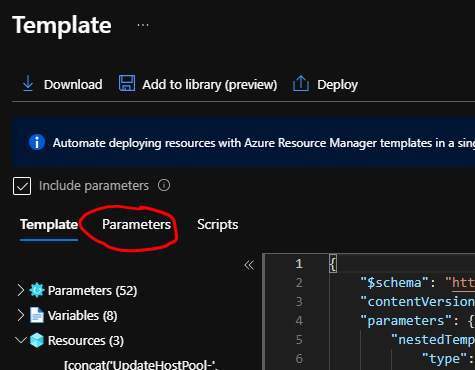
  <li>Now select Parameters</li>
</ul>

<p><img src="/assets/img/blog/2021-06-24-AVDResetHostpoolCount/hpcounter2.PNG" alt="AVD" /></p>

<ul>
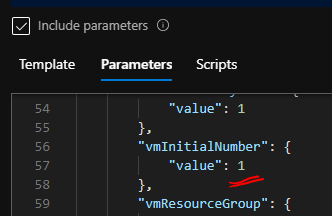
  <li>now look for vmInitialNumber</li>
</ul>

<p><img src="/assets/img/blog/2021-06-24-AVDResetHostpoolCount/hpcounter3.PNG" alt="AVD" /></p>

<ul>
  <li>Change the value from 1, in my case, to 0 or any other number that you want to start VM numbers from.</li>
  <li>Now click Deploy.</li>
</ul>

<h2 id="summary">Summary</h2>

<p>Changing <code class="language-plaintext highlighter-rouge">vmInitialNumber</code> allowed an AVD session-host deployment to start at the required naming sequence while preserving existing hosts for rollback. The portal and deployment templates can change over time, so confirm the current session-host registration workflow and securely handle registration tokens before applying this approach in production.</p>

<p>For an enterprise platform, naming conventions should be predictable, but host replacement and rollback safety are more important than cosmetic numbering. Automating the host lifecycle through reviewed templates or infrastructure as code provides a more dependable long-term pattern.</p>]]></content><author><name>Kamil Lygas</name></author><category term="Azure" /><category term="Virtual Desktop" /><category term="Azure" /><category term="Azure Virtual Desktop" /><category term="Automation" /><summary type="html"><![CDATA[Adjusting the starting VM counter while deploying session hosts to an Azure Virtual Desktop host pool.]]></summary><media:thumbnail xmlns:media="http://search.yahoo.com/mrss/" url="https://nowcloud.pl/assets/img/aboutfeature.jpg" /><media:content medium="image" url="https://nowcloud.pl/assets/img/aboutfeature.jpg" xmlns:media="http://search.yahoo.com/mrss/" /></entry><entry><title type="html">Windows Virtual Desktop became Azure Virtual Desktop</title><link href="https://nowcloud.pl/azure/virtual%20desktop/2021/06/07/WVDRebrandingAVD.html" rel="alternate" type="text/html" title="Windows Virtual Desktop became Azure Virtual Desktop" /><published>2021-06-07T00:00:00+00:00</published><updated>2021-06-07T00:00:00+00:00</updated><id>https://nowcloud.pl/azure/virtual%20desktop/2021/06/07/WVDRebrandingAVD</id><content type="html" xml:base="https://nowcloud.pl/azure/virtual%20desktop/2021/06/07/WVDRebrandingAVD.html"><![CDATA[<p>In June 2021, Microsoft renamed Windows Virtual Desktop to Azure Virtual Desktop (AVD).</p>

<p><img src="/assets/img/blog/2021-06-07-WVDRebrandingAVD/windows-virtual-desktop-wvd-logo-1.png" alt="WVD" /></p>

<!--more-->

<blockquote>
  <p>Updated note (2026): Azure Virtual Desktop (AVD) is the current product name. Azure Active Directory referenced in this historical announcement is now Microsoft Entra ID.</p>
</blockquote>

<p>Microsoft announced in June 2021 that Windows Virtual Desktop (WVD) would be rebranded as Azure Virtual Desktop (AVD).</p>

<p>The rebrand reflected Microsoft’s broader positioning of the service as a cloud VDI and application-delivery platform for hybrid work. For enterprise architecture, the meaningful point was not simply the product name: AVD became an increasingly important platform workload requiring secure identity integration, scalable host management, profile storage, endpoint controls and monitoring.</p>

<p>At announcement time, Microsoft also described new capabilities and pricing options for remote application streaming.</p>

<p>Some of the capabilities discussed in that historical announcement included:</p>

<h2 id="enhanced-support-for-microsoft-entra-id">Enhanced Support for Microsoft Entra ID</h2>

<ul>
  <li>Microsoft Entra ID, then named Azure Active Directory, is a critical service used by organizations to manage user access to important apps and data and maintain strong security controls. At announcement time, Microsoft also described support for joining Azure Virtual Desktop virtual machines directly to that identity service.</li>
</ul>

<h2 id="multi-session-management">Multi-Session Management</h2>

<ul>
  <li>Microsoft Endpoint Manager allows you to manage policies and distribute applications across devices.</li>
</ul>

<p>Microsoft’s original announcement is available in <a href="https://azure.microsoft.com/en-us/blog/azure-virtual-desktop-the-desktop-and-app-virtualization-platform-for-the-hybrid-workplace/">Azure Virtual Desktop: The desktop and app virtualization platform for the hybrid workplace</a>.</p>

<h2 id="summary">Summary</h2>

<p>Azure Virtual Desktop is now the established product name. For new deployments, focus on current AVD documentation and design the service as part of a governed Azure platform: identity, network paths, image management, user profiles, monitoring and operational ownership should be explicit from the start.</p>]]></content><author><name>Kamil Lygas</name></author><category term="Azure" /><category term="Virtual Desktop" /><category term="Azure" /><category term="Azure Virtual Desktop" /><category term="Microsoft Entra ID" /><summary type="html"><![CDATA[The 2021 rebrand of Windows Virtual Desktop to Azure Virtual Desktop and its identity integration direction.]]></summary><media:thumbnail xmlns:media="http://search.yahoo.com/mrss/" url="https://nowcloud.pl/assets/img/aboutfeature.jpg" /><media:content medium="image" url="https://nowcloud.pl/assets/img/aboutfeature.jpg" xmlns:media="http://search.yahoo.com/mrss/" /></entry><entry><title type="html">Secure access to Azure Virtual Desktop with FIDO2 security keys</title><link href="https://nowcloud.pl/azure/identity/2021/06/06/WVDFIDO2.html" rel="alternate" type="text/html" title="Secure access to Azure Virtual Desktop with FIDO2 security keys" /><published>2021-06-06T00:00:00+00:00</published><updated>2021-06-06T00:00:00+00:00</updated><id>https://nowcloud.pl/azure/identity/2021/06/06/WVDFIDO2</id><content type="html" xml:base="https://nowcloud.pl/azure/identity/2021/06/06/WVDFIDO2.html"><![CDATA[<p>Did you know that Microsoft supports FIDO2 security keys in Microsoft Entra ID (formerly Azure Active Directory)?</p>

<p><img src="/assets/img/blog/2021-06-04-WVDFIDO2/5nfc_hero_2021.png" alt="Error" /></p>

<!--more-->

<blockquote>
  <p>Updated note (2026): Windows Virtual Desktop is now Azure Virtual Desktop (AVD), and Azure Active Directory is now Microsoft Entra ID. Screenshots retain the names shown when this article was published.</p>
</blockquote>

<p>Since Azure Virtual Desktop (formerly Windows Virtual Desktop) uses Microsoft Entra ID for authentication, FIDO2 security keys can also be used to secure applications and desktops hosted on Azure Virtual Desktop.</p>

<p>In this post, I will demonstrate how to enable FIDO2 support in Microsoft Entra ID for AVD.</p>

<p>First of all, we need to enable FIDO2 support in Microsoft Entra ID.
Log in to the Azure portal and then navigate to Microsoft Entra ID Authentication methods.</p>

<p>Under Policies blade, select FIDO2. Now under 1) Enable, click on Yes, next under 2) Target select All users or specific pilot group or individual user. 
In my demo, I will only target one user. Now under 3) General, Allow self-service setup, this will allow users to register their security keys</p>

<p><img src="/assets/img/blog/2021-06-04-WVDFIDO2/fido_azuread2.png" alt="Azure AD Authentication methods" /></p>

<p>Now as the Azure part is already configured, we can log in to the Office.com portal and register our security key. 
Once you are logged in, click on your initials in the top right corner and select View Account</p>

<p><img src="/assets/img/blog/2021-06-04-WVDFIDO2/offixceacc_1.png" alt="Office Security Info" /></p>

<p>Now click on Security Info on the left-hand side, or in the middle of the screen</p>

<p><img src="/assets/img/blog/2021-06-04-WVDFIDO2/offixceacc_2.png" alt="Office Security Info" /></p>

<p>Now you should see currently allowed authentication methods. Click Add a method and choose Security Key from the drop-down menu</p>

<p><img src="/assets/img/blog/2021-06-04-WVDFIDO2/offixceacc_3.png" alt="Office Security Info" /></p>

<p>Select the correct device type you are using. For this demo I used USB Yubikey hence I selected USB Device</p>

<p><img src="/assets/img/blog/2021-06-04-WVDFIDO2/offixceacc_4.png" alt="Office Security Info" /></p>

<p>Ok, now it’s time to plug the key into the USB port and start the registration</p>

<p><img src="/assets/img/blog/2021-06-04-WVDFIDO2/offixceacc_5.png" alt="Office Security Info" /></p>

<p>Select PIN for your key</p>

<p><img src="/assets/img/blog/2021-06-04-WVDFIDO2/offixceacc_6.png" alt="Office Security Info" /></p>

<p>Touch your security key to finish registration</p>

<p><img src="/assets/img/blog/2021-06-04-WVDFIDO2/offixceacc_7.png" alt="Office Security Info" /></p>

<p>That is the key now registered with my test account and ready to use. Let us try it with Azure Virtual Desktop.</p>

<p><img src="/assets/img/blog/2021-06-04-WVDFIDO2/offixceacc_8.png" alt="Office Security Info" /></p>

<p>Launch Microsoft Remote Desktop client and hit subscribe. On the Microsoft signing page, click on Sign-in options. 
You should now see the below options, click on Sign in with Windows Hello or a security key</p>

<p><img src="/assets/img/blog/2021-06-04-WVDFIDO2/fido2_0.PNG" alt="Remote Desktop Client" /></p>

<p>Now, type in the PIN that we set up earlier on for our key</p>

<p><img src="/assets/img/blog/2021-06-04-WVDFIDO2/fido2_1.png" alt="Remote Desktop Client" /></p>

<p>Touch the key</p>

<p><img src="/assets/img/blog/2021-06-04-WVDFIDO2/offixceacc_7.png" alt="Remote Desktop Client" /></p>

<p><img src="/assets/img/blog/2021-06-04-WVDFIDO2/fido2_3.jpg" alt="Remote Desktop Client" /></p>

<p>And we are in!</p>

<p><img src="/assets/img/blog/2021-06-04-WVDFIDO2/rdp_in.png" alt="Remote Desktop Client" /></p>

<p>The same process applies when accessing AVD via the web client.</p>

<h2 id="summary">Summary</h2>

<p>FIDO2 security keys provide a phishing-resistant authentication option for Azure Virtual Desktop access through Microsoft Entra ID. Before using this approach in production, validate supported clients, authentication-method policy scope, Conditional Access requirements, recovery processes and service-desk support for lost or replaced keys.</p>

<p>The architecture takeaway is that a virtual desktop platform is only as secure as its access path: strong user authentication should be designed alongside session controls, application authorization and operational monitoring.</p>]]></content><author><name>Kamil Lygas</name></author><category term="Azure" /><category term="Identity" /><category term="Azure" /><category term="Azure Virtual Desktop" /><category term="Microsoft Entra ID" /><category term="FIDO2" /><summary type="html"><![CDATA[Using FIDO2 security keys with Microsoft Entra ID to strengthen access to Azure Virtual Desktop.]]></summary><media:thumbnail xmlns:media="http://search.yahoo.com/mrss/" url="https://nowcloud.pl/assets/img/aboutfeature.jpg" /><media:content medium="image" url="https://nowcloud.pl/assets/img/aboutfeature.jpg" xmlns:media="http://search.yahoo.com/mrss/" /></entry><entry><title type="html">Enable Continuous Access Evaluation in Microsoft Entra ID</title><link href="https://nowcloud.pl/azure/identity/2021/06/05/ContinuosAccessEvaluation.html" rel="alternate" type="text/html" title="Enable Continuous Access Evaluation in Microsoft Entra ID" /><published>2021-06-05T00:00:00+00:00</published><updated>2021-06-05T00:00:00+00:00</updated><id>https://nowcloud.pl/azure/identity/2021/06/05/ContinuosAccessEvaluation</id><content type="html" xml:base="https://nowcloud.pl/azure/identity/2021/06/05/ContinuosAccessEvaluation.html"><![CDATA[<p>Continuous Access Evaluation (CAE) helps supported applications respond quickly to critical identity and access events in Microsoft Entra ID, rather than waiting for an access token to expire.</p>

<!--more-->

<blockquote>
  <p>Updated note (2026): Azure Active Directory is now Microsoft Entra ID. This article originally described a preview-era activation flow; CAE is now a current capability with behavior and support requirements documented by Microsoft. Use the current Microsoft Learn guidance when designing or troubleshooting deployments.</p>
</blockquote>

<h2 id="why-token-lifetime-is-not-enough">Why Token Lifetime Is Not Enough</h2>

<p>Cloud applications commonly authorize a session using an access token. A token is valid for a period and avoids authentication on every request. That model creates an important security question: what happens when a user’s risk or authorization changes while the token remains valid?</p>

<p>Consider an employee account that is disabled, a password reset following suspected compromise, a user moved away from a trusted location, or an administrator revoking sessions. Waiting until an existing token naturally expires can leave access available for longer than the business risk allows.</p>

<p>Security architecture should therefore distinguish between initial authentication and continuous enforcement. Strong authentication reduces the likelihood of unauthorized sign-in. Conditional Access determines whether access should be permitted under evaluated conditions. CAE helps supported applications learn about certain changes and enforce them sooner during an existing session.</p>

<h2 id="what-continuous-access-evaluation-does">What Continuous Access Evaluation Does</h2>

<p>CAE allows supported resource providers and clients to respond to critical events and Conditional Access policy changes in near real time. Instead of relying only on a fixed token interval, a CAE-capable service can challenge a client to obtain a new token when the service becomes aware of an event that affects access.</p>

<p>Microsoft documents critical events that can trigger this type of response, including:</p>

<ul>
  <li>A user account being deleted or disabled.</li>
  <li>A password being changed or reset.</li>
  <li>Multifactor authentication being enabled for a user.</li>
  <li>An administrator explicitly revoking user sessions or refresh tokens.</li>
  <li>Elevated user risk detected by Microsoft Entra ID Protection.</li>
</ul>

<p>Conditional Access location policy enforcement can also respond when the relevant network location changes, provided the application, client and policy combination supports CAE behavior.</p>

<p>This does not mean every session everywhere is instantly disconnected. CAE depends on supported clients, resource providers, policy configuration and available signals. An architecture decision must account for that support boundary.</p>

<h2 id="relationship-to-conditional-access">Relationship to Conditional Access</h2>

<p>Conditional Access is the policy layer: it expresses conditions such as user, application, device, location or risk and specifies controls such as multifactor authentication or blocking access. CAE complements that policy layer by enabling faster reevaluation for supported scenarios while a session is active.</p>

<p>For example, an organization may define trusted network locations for sensitive Microsoft 365 resources. If a CAE-capable session moves from a trusted network to an untrusted location, the resource can require the client to refresh access and apply the Conditional Access decision without waiting for a normal token expiry cycle.</p>

<p>CAE is not a replacement for Conditional Access policy design. Poorly scoped policies, incomplete exclusions, missing emergency-access planning or unsupported applications remain architectural concerns regardless of CAE.</p>

<h2 id="session-revocation-scenarios">Session Revocation Scenarios</h2>

<p>CAE is particularly relevant to security operations and identity lifecycle processes:</p>

<h3 id="account-disablement">Account Disablement</h3>

<p>When a user leaves the organization or an account is disabled during incident response, supported sessions can lose access more quickly. This reduces exposure compared with relying only on normal token expiry.</p>

<h3 id="password-reset-or-credential-concern">Password Reset or Credential Concern</h3>

<p>A password reset can be part of responding to suspected credential compromise. CAE helps make that action meaningful for supported cloud application sessions, but the response plan should also assess device security, authentication methods and any workload identities involved.</p>

<h3 id="administrator-revocation">Administrator Revocation</h3>

<p>An administrator may revoke sessions when investigating risky sign-ins or when a user device is lost. This is an operational control that should be documented and tested by the identity and security operations teams.</p>

<h3 id="location-change">Location Change</h3>

<p>With appropriate Conditional Access policies, changing from an allowed to a disallowed network location can lead to faster policy enforcement for CAE-capable applications. Network location definitions and named location governance therefore become part of identity architecture.</p>

<h2 id="design-and-verification-approach">Design and Verification Approach</h2>

<p>The original preview-era instruction to select an <code class="language-plaintext highlighter-rouge">Enable preview</code> option is no longer a suitable configuration tutorial. A current design approach is:</p>

<ol>
  <li>Identify applications and user groups where rapid enforcement is important, such as sensitive Microsoft 365 access or administrator workflows.</li>
  <li>Review Microsoft’s current list of CAE-supported clients, resource providers and Conditional Access scenarios.</li>
  <li>Confirm that Conditional Access policies express the intended controls and that emergency access accounts are appropriately protected.</li>
  <li>Validate session revocation and location-change behavior with representative supported clients.</li>
  <li>Monitor sign-in and audit information during testing and record expected operational response steps.</li>
  <li>Include unsupported or legacy application behavior in residual-risk decisions.</li>
</ol>

<p>This validation should take place in a controlled tenant or pilot scope before it influences broad access policies.</p>

<h2 id="client-and-application-support-considerations">Client and Application Support Considerations</h2>

<p>CAE is valuable precisely because applications participate in enforcement. That participation means client and resource support matters. Older clients, some protocols, custom applications or third-party applications may not behave in the same way as current supported Microsoft 365 applications.</p>

<p>Architects should not describe the environment as protected by CAE merely because Microsoft Entra ID is in use. They should document:</p>

<ul>
  <li>Which resources and client types are expected to support CAE.</li>
  <li>Which Conditional Access policies depend on location or other reevaluation signals.</li>
  <li>How non-CAE-capable applications are controlled.</li>
  <li>How security operations revoke sessions and validate the outcome.</li>
  <li>What logs or investigations demonstrate that enforcement occurred.</li>
</ul>

<p>Where a business application requires rapid revocation but does not support suitable controls, that gap needs risk treatment rather than assumption.</p>

<h2 id="identity-governance-and-regulated-environments">Identity Governance and Regulated Environments</h2>

<p>In regulated or sovereign platform contexts, the ability to respond quickly to critical identity events contributes to operational assurance. An organization may need to demonstrate that privileged or sensitive access is governed, monitored and revoked through defined procedures.</p>

<p>CAE should sit within a broader identity architecture that includes Microsoft Entra ID roles, Privileged Identity Management where appropriate, strong authentication, Conditional Access, identity lifecycle management, access reviews, logging and incident response. It is one control in a layered design.</p>

<h2 id="limitations-and-operational-considerations">Limitations and Operational Considerations</h2>

<p>CAE reduces response time for supported scenarios; it is not a guarantee of immediate enforcement across every application and connection. Network interruptions, unsupported clients, service behavior and policy scope can affect results. Teams should keep current with Microsoft documentation and re-test critical access scenarios after significant policy, client or application changes.</p>

<h2 id="summary">Summary</h2>

<p>Continuous Access Evaluation strengthens cloud access design by helping supported Microsoft Entra ID sessions react sooner to critical identity events and relevant Conditional Access changes. It addresses a gap that token lifetime alone cannot solve, but its value depends on supported applications, sound policy design and tested operational procedures.</p>

<p>For enterprise Azure and Microsoft 365 architecture, CAE should be treated as part of a broader identity and security control model: strong authentication, least privilege, governed policy, visibility and dependable incident response.</p>

<h2 id="further-reading">Further Reading</h2>

<ul>
  <li><a href="https://learn.microsoft.com/en-us/entra/identity/conditional-access/concept-continuous-access-evaluation">Continuous access evaluation in Microsoft Entra</a></li>
  <li><a href="https://learn.microsoft.com/en-us/entra/identity/conditional-access/">Conditional Access documentation</a></li>
  <li><a href="https://learn.microsoft.com/en-us/entra/identity/users/users-revoke-access">Revoke user access in Microsoft Entra ID</a></li>
</ul>]]></content><author><name>Kamil Lygas</name></author><category term="Azure" /><category term="Identity" /><category term="Azure" /><category term="Microsoft Entra ID" /><category term="Continuous Access Evaluation" /><category term="Conditional Access" /><summary type="html"><![CDATA[Continuous Access Evaluation architecture considerations for faster response to identity and access changes in Microsoft Entra ID.]]></summary><media:thumbnail xmlns:media="http://search.yahoo.com/mrss/" url="https://nowcloud.pl/assets/img/aboutfeature.jpg" /><media:content medium="image" url="https://nowcloud.pl/assets/img/aboutfeature.jpg" xmlns:media="http://search.yahoo.com/mrss/" /></entry><entry><title type="html">Azure Files SMB Multichannel: Performance, Requirements and Configuration</title><link href="https://nowcloud.pl/azure/storage/2021/06/04/ConfigureAZStorageSMBMulti.html" rel="alternate" type="text/html" title="Azure Files SMB Multichannel: Performance, Requirements and Configuration" /><published>2021-06-04T00:00:00+00:00</published><updated>2021-06-04T00:00:00+00:00</updated><id>https://nowcloud.pl/azure/storage/2021/06/04/ConfigureAZStorageSMBMulti</id><content type="html" xml:base="https://nowcloud.pl/azure/storage/2021/06/04/ConfigureAZStorageSMBMulti.html"><![CDATA[<p>Azure Files SMB Multichannel enables supported SMB clients to establish multiple network connections to an Azure file share, improving throughput for demanding file workloads.</p>

<p><img src="/assets/img/blog/2021-06-06-ConfigureAZStorageSMBMulti/smb-multi1.jpg" alt="SMB Multichannel" /></p>

<!--more-->

<blockquote>
  <p>Updated note (2026): SMB Multichannel for Azure Files is no longer a preview enrollment workflow. Current Microsoft documentation states that Azure Files supports SMB Multichannel on SSD file shares and that it is enabled by default for Windows clients in all Azure regions. Validate current constraints in Microsoft Learn before production deployment.</p>
</blockquote>

<h2 id="what-smb-multichannel-does">What SMB Multichannel Does</h2>

<p>SMB Multichannel is part of the SMB 3.x protocol family. Instead of establishing a single client-to-file-share connection, a compatible client can open multiple network connections for the same SMB session. The client can use available network interfaces and Receive Side Scaling (RSS) capabilities to distribute I/O across processors and paths.</p>

<p>For Azure Files, the practical outcome is improved throughput for workloads that need to move large amounts of data between a supported Windows client and an SSD file share. It is not an automatic answer to every performance issue. Latency, storage tier, file size, I/O pattern, VM sizing, network path and application behavior still matter.</p>

<h2 id="why-it-matters-for-azure-files">Why It Matters for Azure Files</h2>

<p>Azure Files provides managed SMB shares without requiring an organization to operate file server virtual machines. For workloads that already use Azure Files and need greater throughput from a client or a small set of clients, SMB Multichannel can make better use of the available network and storage capability.</p>

<p>This is most useful when a performance assessment shows that the workload is constrained by a single SMB connection or client-side network processing, rather than by storage limits or application design. Architecture work should begin with workload measurements and expected service limits, not with enabling features in isolation.</p>

<h2 id="where-it-helps">Where It Helps</h2>

<p>Potential scenarios include:</p>

<ul>
  <li>Large file transfer and content-processing workloads where clients perform sustained reads or writes.</li>
  <li>Media, engineering or analytical processing in which a small number of machines access large datasets.</li>
  <li>High-throughput application shares that are already suitable for managed SMB storage.</li>
  <li>Some Azure Virtual Desktop (AVD) profile or container scenarios, where relevant and validated by performance testing.</li>
</ul>

<p>Small files, metadata-heavy operations or applications dominated by latency may see limited benefit. Profile storage for AVD also requires particular care because user experience depends on resilience and supportability as well as throughput.</p>

<h2 id="requirements-and-constraints">Requirements and Constraints</h2>

<p>Microsoft documentation currently identifies the following important requirements:</p>

<ul>
  <li>Azure Files SMB Multichannel is supported on SSD file shares.</li>
  <li>Clients must use a supported SMB 3.x configuration and should be kept current with recommended operating system updates.</li>
  <li>Windows clients support SMB Multichannel, which is enabled by default in normal current configurations.</li>
  <li>A maximum of four channels applies to Azure Files SMB Multichannel.</li>
</ul>

<p>Consult current Azure Files scalability and SMB documentation when selecting storage tier, redundancy and client sizing. A design based on an old preview limit or a laboratory workload can produce disappointing results in production.</p>

<h2 id="ssd-file-shares-and-storage-accounts">SSD File Shares and Storage Accounts</h2>

<p>The original version of this article described premium file shares in <code class="language-plaintext highlighter-rouge">FileStorage</code> accounts during preview. In current design discussions, it is clearer to refer to SSD file shares and validate the precise Azure Files account and tier configuration against Microsoft’s current service documentation.</p>

<p>Use an SSD file share where the workload requires predictable high performance and the cost model is justified by measured requirements. Record the target workload profile, expected throughput, IOPS, capacity, resilience and backup needs as part of the platform decision.</p>

<h2 id="network-considerations">Network Considerations</h2>

<h3 id="smb-3x-and-tcp-445">SMB 3.x and TCP 445</h3>

<p>SMB traffic to Azure Files uses TCP 445. Clients must be able to reach the intended file share over an approved network route. For Azure-hosted workloads this may be straightforward; for on-premises or remote clients, network policies and service-provider restrictions require explicit validation.</p>

<h3 id="private-endpoints-and-dns-resolution">Private Endpoints and DNS Resolution</h3>

<p>Enterprise platforms commonly use private endpoints for storage access. In that architecture, correct private DNS resolution is essential: the storage account name must resolve to the approved private endpoint address from each connected network that uses the share. A throughput feature cannot correct DNS misrouting or an unintended public access path.</p>

<p>Private endpoint design should therefore align with landing-zone DNS patterns, hub-and-spoke connectivity, conditional forwarding from on-premises networks and ownership of private DNS zone links. Test name resolution and the connection path before measuring performance.</p>

<h3 id="client-os-and-rss-capable-interfaces">Client OS and RSS-Capable Interfaces</h3>

<p>Client operating systems need supported SMB behavior and current patches. RSS-capable network interfaces allow processing to scale across CPUs, which is one of the ways SMB Multichannel can increase throughput. The client VM size and NIC capabilities should be appropriate for the throughput target; an undersized client remains a bottleneck.</p>

<h2 id="check-the-current-configuration">Check the Current Configuration</h2>

<p>Use Azure CLI to inspect the SMB Multichannel setting on an Azure storage account:</p>

<div class="language-bash highlighter-rouge"><div class="highlight"><pre class="highlight"><code>az storage account file-service-properties show <span class="se">\</span>
  <span class="nt">--resource-group</span> &lt;resource-group&gt; <span class="se">\</span>
  <span class="nt">--account-name</span> &lt;storage-account&gt; <span class="se">\</span>
  <span class="nt">--query</span> <span class="s2">"protocolSettings.smb.multichannel.enabled"</span>
</code></pre></div></div>

<p>Depending on when an account was created and whether the property was explicitly set, documentation may describe a null value as meaning that default service settings apply. Confirm the behavior for your account rather than treating a missing value as a failure.</p>

<h2 id="enable-smb-multichannel-using-azure-cli">Enable SMB Multichannel Using Azure CLI</h2>

<p>If the service-side property needs to be explicitly enabled for the selected account, use:</p>

<div class="language-bash highlighter-rouge"><div class="highlight"><pre class="highlight"><code>az storage account file-service-properties update <span class="se">\</span>
  <span class="nt">--resource-group</span> &lt;resource-group&gt; <span class="se">\</span>
  <span class="nt">--account-name</span> &lt;storage-account&gt; <span class="se">\</span>
  <span class="nt">--enable-smb-multichannel</span> <span class="nb">true</span>
</code></pre></div></div>

<p>Apply changes first in a non-production environment or a controlled change window. Record the before-and-after setting and measured workload behavior.</p>

<h2 id="enable-smb-multichannel-using-powershell">Enable SMB Multichannel Using PowerShell</h2>

<p>The following Azure PowerShell example retrieves the storage account and inspects its file service property:</p>

<div class="language-powershell highlighter-rouge"><div class="highlight"><pre class="highlight"><code><span class="nv">$storageAccount</span><span class="w"> </span><span class="o">=</span><span class="w"> </span><span class="n">Get-AzStorageAccount</span><span class="w"> </span><span class="se">`
</span><span class="w">  </span><span class="nt">-ResourceGroupName</span><span class="w"> </span><span class="s2">"&lt;resource-group&gt;"</span><span class="w"> </span><span class="se">`
</span><span class="w">  </span><span class="nt">-Name</span><span class="w"> </span><span class="s2">"&lt;storage-account&gt;"</span><span class="w">

</span><span class="n">Get-AzStorageFileServiceProperty</span><span class="w"> </span><span class="nt">-StorageAccount</span><span class="w"> </span><span class="nv">$storageAccount</span><span class="w">
</span></code></pre></div></div>

<p>Enable SMB Multichannel explicitly where required:</p>

<div class="language-powershell highlighter-rouge"><div class="highlight"><pre class="highlight"><code><span class="n">Update-AzStorageFileServiceProperty</span><span class="w"> </span><span class="se">`
</span><span class="w">  </span><span class="nt">-StorageAccount</span><span class="w"> </span><span class="nv">$storageAccount</span><span class="w"> </span><span class="se">`
</span><span class="w">  </span><span class="nt">-EnableSmbMultichannel</span><span class="w"> </span><span class="bp">$true</span><span class="w">
</span></code></pre></div></div>

<p>Use placeholders deliberately and replace them with values from the intended subscription and resource group only after change review. Always verify the selected Azure context before changing a production storage account.</p>

<h2 id="verify-from-a-windows-client">Verify from a Windows Client</h2>

<p>First confirm whether the Windows SMB client has Multichannel enabled:</p>

<div class="language-powershell highlighter-rouge"><div class="highlight"><pre class="highlight"><code><span class="n">Get-SmbClientConfiguration</span><span class="w"> </span><span class="o">|</span><span class="w"> </span><span class="n">Select-Object</span><span class="w"> </span><span class="nx">EnableMultichannel</span><span class="w">
</span></code></pre></div></div>

<p>Inspect interfaces visible to SMB:</p>

<div class="language-powershell highlighter-rouge"><div class="highlight"><pre class="highlight"><code><span class="n">Get-SmbClientNetworkInterface</span><span class="w">
</span></code></pre></div></div>

<p>After connecting to the Azure file share and generating suitable I/O, inspect active multichannel connections:</p>

<div class="language-powershell highlighter-rouge"><div class="highlight"><pre class="highlight"><code><span class="n">Get-SmbMultichannelConnection</span><span class="w">
</span></code></pre></div></div>

<p>Verification requires an active workload. If no meaningful file I/O is taking place, the result may not demonstrate the performance behavior being assessed.</p>

<h2 id="troubleshooting">Troubleshooting</h2>

<p>If expected channels or throughput do not appear, investigate the problem in layers:</p>

<ol>
  <li>Confirm that the file share is in a supported SSD configuration and that service-side SMB Multichannel is enabled or using the expected default.</li>
  <li>Confirm that the client uses a supported, patched Windows configuration and that <code class="language-plaintext highlighter-rouge">EnableMultichannel</code> is true.</li>
  <li>Validate DNS resolution and the actual network path, especially when private endpoints are used.</li>
  <li>Check TCP 445 reachability and any firewall, network security group or forced-routing behavior.</li>
  <li>Inspect client VM and network interface capability, including RSS visibility and available CPU/network performance.</li>
  <li>Measure using representative file sizes and concurrency rather than a single small copy operation.</li>
  <li>Compare observed performance with documented Azure Files limits and the storage account design.</li>
</ol>

<p>Performance troubleshooting should collect evidence: share configuration, network path, client specifications, test method, throughput and relevant diagnostics. Without that evidence it is easy to attribute a bottleneck to the wrong platform layer.</p>

<h2 id="enterprise-architecture-considerations">Enterprise Architecture Considerations</h2>

<p>In a governed Azure platform, file services should fit established patterns for identity, networking, private DNS, monitoring, backup and cost ownership. If Azure Files is offered as a reusable capability for product teams, the platform contract should state which tiers are supported, how private endpoints and DNS are created, how identity-based access is configured and how high-performance requirements are assessed.</p>

<p>For AVD or another shared platform, avoid assuming that one tuning setting solves all user-experience questions. Profile storage design, availability, authentication, backup, image operations and user concurrency all contribute to outcomes.</p>

<p>Treat SMB Multichannel as an optimization that can be enabled and validated within a well-designed file-service pattern. It is most credible when the decision is driven by measured workload need and verified after deployment.</p>

<h2 id="summary">Summary</h2>

<p>Azure Files SMB Multichannel can improve throughput for supported Windows clients accessing SSD file shares by using multiple SMB connections. A sound implementation validates storage tier, client support, network and private DNS design, explicit configuration and observed performance. The former preview registration workflow is no longer the appropriate setup path.</p>

<h2 id="further-reading">Further Reading</h2>

<ul>
  <li><a href="https://learn.microsoft.com/en-us/azure/storage/files/files-smb-protocol">SMB file shares in Azure Files</a></li>
  <li><a href="https://learn.microsoft.com/en-us/azure/storage/files/storage-files-smb-multichannel-performance">Improve SMB Azure file share performance</a></li>
  <li><a href="https://learn.microsoft.com/en-us/windows-server/storage/storage-spaces/manage-smb-multichannel">Manage SMB Multichannel on Windows Server</a></li>
</ul>]]></content><author><name>Kamil Lygas</name></author><category term="Azure" /><category term="Storage" /><category term="Azure" /><category term="Azure Files" /><category term="Networking" /><category term="Azure Virtual Desktop" /><summary type="html"><![CDATA[Design and configuration guidance for Azure Files SMB Multichannel on high-throughput SSD file shares.]]></summary><media:thumbnail xmlns:media="http://search.yahoo.com/mrss/" url="https://nowcloud.pl/assets/img/aboutfeature.jpg" /><media:content medium="image" url="https://nowcloud.pl/assets/img/aboutfeature.jpg" xmlns:media="http://search.yahoo.com/mrss/" /></entry></feed>