
How to reset AVD Host Pool Counter
This note shows how the starting virtual-machine number was adjusted when adding session hosts to an Azure Virtual Desktop host pool without removing existing hosts.
Updated note (2026): Shared Image Gallery (SIG) is now Azure Compute Gallery. Confirm current Azure Virtual Desktop session host deployment options before following this historical portal workflow.
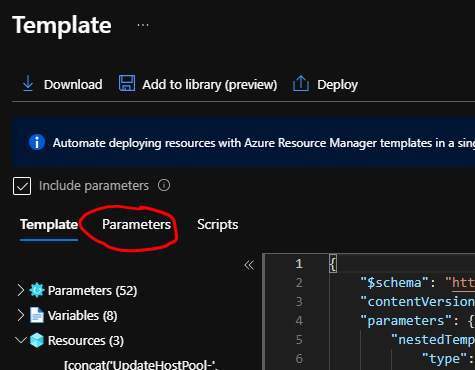
This is a quick post related to the Azure Virtual Desktop Host Pool update process. Microsoft recommends rebuilding the session host from the latest, fully patched image stored in Azure Compute Gallery (formerly Shared Image Gallery). This is an overall smooth and easy process; however, the issue I had was around the host prefix counter. Every new host added to the pool gets an incremental number unless you delete all the session hosts from the pool. In my case, I didn’t want to delete the host in case I need to roll back and a customer wanted the host numbers to start from 0-10. The solution to this is pretty simple, modify the ARM Template before hitting Create button. Follow the normal process of adding a new host to the host pool but at the very last step, instead of clicking Create, click on Download a template for automation

- Now select Parameters
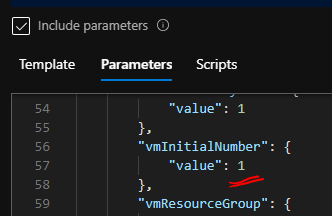
- now look for vmInitialNumber
- Change the value from 1, in my case, to 0 or any other number that you want to start VM numbers from.
- Now click Deploy.
Summary
Changing vmInitialNumber allowed an AVD session-host deployment to start at the required naming sequence while preserving existing hosts for rollback. The portal and deployment templates can change over time, so confirm the current session-host registration workflow and securely handle registration tokens before applying this approach in production.
For an enterprise platform, naming conventions should be predictable, but host replacement and rollback safety are more important than cosmetic numbering. Automating the host lifecycle through reviewed templates or infrastructure as code provides a more dependable long-term pattern.
Follow Azure architecture notes
Follow new Azure architecture notes via RSS or connect with me on LinkedIn. Public technical work is also available on GitHub. For focused platform feedback, see Azure architecture reviews.