
Designing Pod-Based Global DNS for Azure Landing Zones
As enterprise Azure estates grow, DNS moves from being an application configuration item to being a platform control plane. A useful namespace should express durable ownership and resolution boundaries across public services, private endpoints, hybrid networks and product landing zones.
Short answer
Pod-based global DNS organises an enterprise DNS namespace around stable platform units such as region, pod, environment, cloud provider or product boundary. It prevents each workload from inventing names independently and gives the platform a governed model for public and private resolution across Azure, hybrid networks and product teams.
The pattern makes delegation, RBAC, automation and troubleshooting align with platform operation.
Problem
Many platforms begin with a few application-specific records: a public web name, perhaps a private database alias, and a small number of teams able to make DNS changes. The model becomes difficult once the estate includes multiple Azure regions, other clouds, sovereign or regulated boundaries, hub-and-spoke connectivity and broad use of Private Link.
Typical symptoms appear quickly:
- Names are inconsistent because every delivery team chooses a different convention.
- No one can explain clearly whether a DNS record belongs to the platform, the network team or a product owner.
- Public and private records are mixed without a documented split-horizon policy.
- Teams create duplicate private zones for the same Azure service.
- Product landing zones create unmanaged zones that do not resolve from shared or hybrid networks.
- Conditional forwarding from on-premises is introduced after applications already depend on private names.
- Private endpoints expose the missing DNS operating model because deployment succeeds while name resolution fails.
What is a pod in platform DNS?
A pod is a stable platform unit used to group namespace, connectivity and ownership. It might represent a region, country, environment, cloud-provider boundary, product platform shard, regulated or sovereign boundary, or an operational ownership boundary.
A pod is not necessarily a Kubernetes pod. In this design it is an enterprise platform construct. For example, zone1 may describe a platform boundary with a defined landing-zone pattern, resolver path and operating team. It remains meaningful even when applications, clusters or subscriptions are replaced.
A good pod label outlives an individual workload or deployment slot.
The neutral labels in this article are intentionally generic. In a real platform, a pod label might encode a durable boundary such as region, environment or regulatory scope. Examples could include ukp01 for a UK production pod, eun01 for a North Europe non-production pod, or sovereign01 for a regulated boundary. The exact code matters less than the rule behind it: the label should represent a boundary the platform can operate, govern and troubleshoot for years.
Why DNS should follow platform boundaries
DNS names should communicate stable control boundaries rather than temporary projects. Operators investigating api.app1.zone1.example.com can infer an application and a platform zone without being exposed to subscription IDs or implementation detail.
Ownership should follow the same structure. A central platform team can own zone1.example.com, the pod capability and standard private endpoint zones. A delegated application team can manage approved records within its application scope through automation and limited RBAC. This gives autonomy without granting every workload the ability to build an unrelated DNS architecture.
Architecture takeaway: Design DNS around boundaries that remain stable during application change: platform, pod, product, resolution visibility and operational ownership.
Public DNS delegation model
Consider a public hierarchy:
example.com
|-- zone1.example.com
|   `-- app1.zone1.example.com
|-- zone2.example.com
`-- zone3.example.com
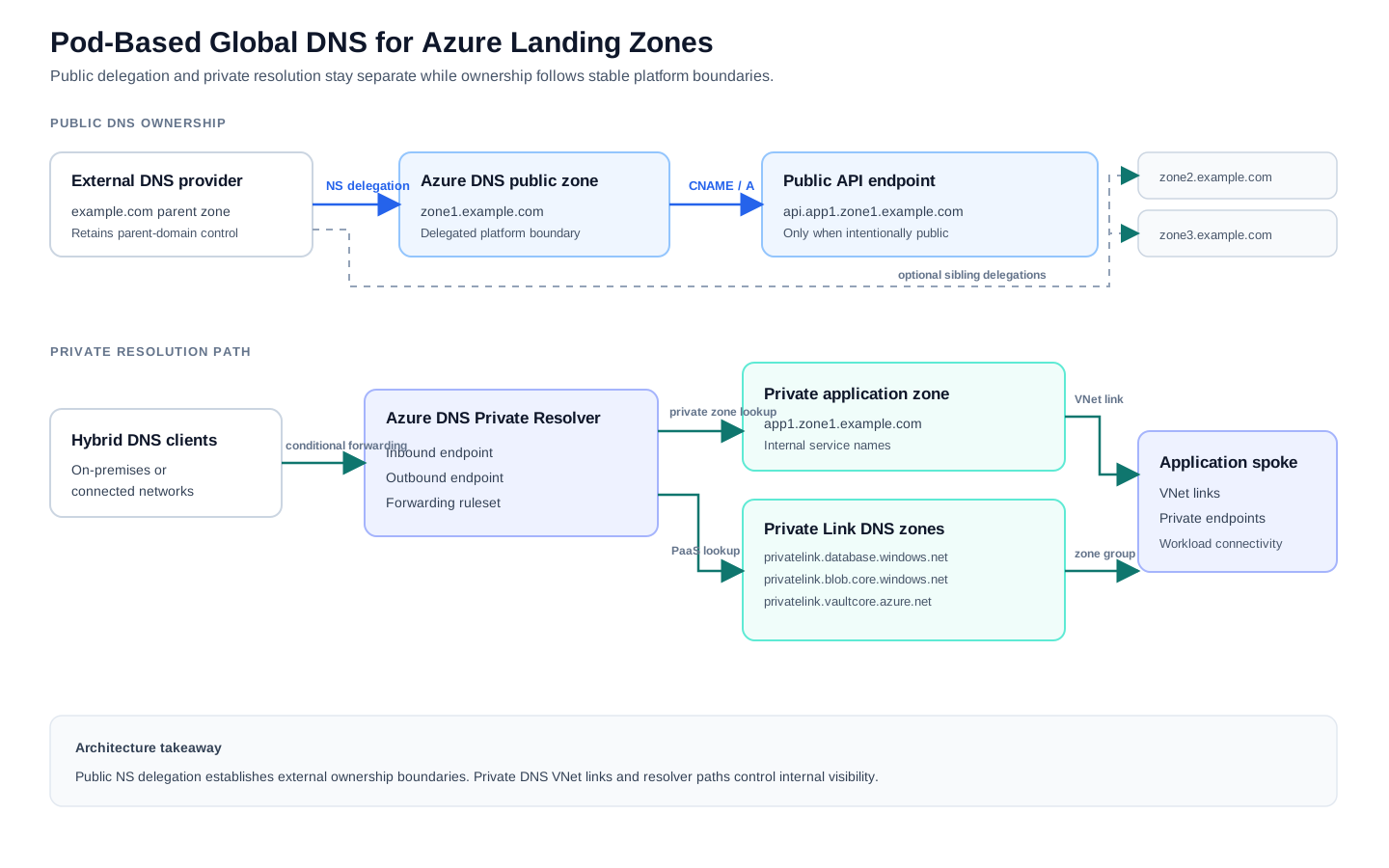
example.com is the parent domain in this example. The domain owner may keep it with its registrar or existing public DNS provider. The parent can delegate zone1.example.com to an Azure DNS public zone by publishing NS records that identify the authoritative Azure DNS name servers for the child zone. zone2 and zone3 illustrate other neutral platform or hyperscaler boundaries without exposing provider-specific naming.
In a true multi-cloud namespace, zone2.example.com or zone3.example.com could equally be delegated via NS records to a different provider’s DNS service (for example AWS Route 53 or Google Cloud DNS), using the same parent-domain delegation mechanism shown for zone1.example.com. This article focuses on the Azure-side implementation of one such pod; the same pattern applies to pods hosted on other platforms.
Azure DNS hosts authoritative public DNS zones and their records; it is not the registrar that sells or registers example.com. The platform therefore needs both ownership of the registered parent domain and a controlled process for adding delegations.
Public DNS is the correct place for public endpoints, public ingress, internet-facing service discovery and domain ownership validation. For example, an intentionally public API could use:
api.app1.zone1.example.com
Architecture takeaway: Use public DNS delegation for public ownership boundaries. Do not use public DNS as a substitute for Private DNS resolution.
Private DNS and split-horizon model
Public and private DNS can publish different answers for the same name or for related namespace branches. Azure Private DNS zones resolve from virtual networks linked to those zones, or from clients reaching an approved Azure resolution path. They are not internet-public DNS zones and are not delegated through public registrar NS records.
This distinction matters:
- Public delegation uses NS records in the public parent DNS hierarchy.
- Azure Private DNS visibility uses virtual network links and resolver architecture.
- Linking a private zone does not publicly delegate it.
- Delegating a public child zone does not make private records resolvable from landing-zone networks.
Split-horizon must be deliberate. If app1.zone1.example.com exists as both a public and a private zone, clients with access to the private zone consult the private view for that namespace. They do not automatically fall back to the public zone for a missing api record. The platform must either publish an appropriate api record in both views or place private-only records in a narrower zone such as internal.app1.zone1.example.com.
Pod namespace example
The following model separates identity from connectivity:
| Purpose | Namespace example |
|---|---|
| Parent public domain | example.com |
| Neutral platform zones | zone1.example.com, zone2.example.com, zone3.example.com |
| Pod boundary used in this pattern | zone1.example.com |
| Application boundary | app1.zone1.example.com |
| Public application name | api.app1.zone1.example.com |
| Private application names | internal.app1.zone1.example.com, db.app1.zone1.example.com |
| Azure SQL Private Link zone | privatelink.database.windows.net |
| Storage blob Private Link zone | privatelink.blob.core.windows.net |
| Key Vault Private Link zone | privatelink.vaultcore.azure.net |
Custom platform names and the Microsoft-recommended privatelink.* zones address different needs. A custom name communicates product and pod identity and can represent an internal application contract. A privatelink.* private zone enables standard Azure PaaS hostnames to resolve to private endpoint addresses for the corresponding Azure service.
Do not replace the required Azure Private Link service-zone pattern with a custom alias; applications often connect using the Azure service hostname.
Hands-on implementation pattern
This is a reference implementation, not a copy-paste production design. It shows where public zones, private zones, resolver paths and validation records fit.
The CLI commands below are deliberately small so the control planes are visible. In an enterprise landing zone, the same intent should usually be delivered through infrastructure as code, Azure Policy guardrails and approved deployment modules rather than through manual portal or CLI changes.
In this model:
example.comremains under registrar or parent DNS-provider control.zone1.example.comis delegated to an Azure DNS public zone.api.app1.zone1.example.comexists publicly only when the API is intentionally public.app1.zone1.example.comis an Azure Private DNS split-horizon zone for internal client resolution.- Microsoft
privatelink.*zones remain separate Azure Private DNS zones for Azure private endpoints. - Azure DNS Private Resolver provides controlled hybrid resolution paths through the connectivity hub.
Step 1: Create or delegate the public platform zone
Create the public service zone in a platform-owned resource group. Azure DNS assigns authoritative name servers when the zone is created; those assigned servers must then be added as NS records at the parent example.com provider.
az group create \
  --name rg-dns-public-platform \
  --location <azure-region>

az network dns zone create \
  --resource-group rg-dns-public-platform \
  --name zone1.example.com

az network dns record-set ns show \
  --resource-group rg-dns-public-platform \
  --zone-name zone1.example.com \
  --name @
Delegate zone1.example.com using the returned Azure name servers; each created zone receives its own authoritative values.
In the external parent example.com zone, the delegation looks like this:
Record name in example.com |
Type | Value supplied by Azure DNS |
|---|---|---|
zone1 |
NS |
ns1-01.azure-dns.com. |
zone1 |
NS |
ns2-01.azure-dns.net. |
zone1 |
NS |
ns3-01.azure-dns.org. |
zone1 |
NS |
ns4-01.azure-dns.info. |
These name-server hostnames are illustrative only. Enter the exact four NS targets assigned to the created Azure DNS zone. Public queries below zone1.example.com are then referred to Azure DNS, while example.com remains with its existing provider.
Once delegation is effective, a deliberately public application name can be published in the delegated zone. A CNAME might point to a governed public ingress hostname, for example:
az network dns record-set cname set-record \
  --resource-group rg-dns-public-platform \
  --zone-name zone1.example.com \
  --record-set-name api.app1 \
  --cname ingress.zone1.example.com \
  --ttl 300
Step 2: Establish the private pod/product view
For a deliberate split-horizon design, create a private zone for the product namespace and link only networks that need its private view:
In a CAF-style platform, application or product-specific private zones may be owned by the product platform or by a delegated product boundary, while shared Azure Private Link zones normally belong with the connectivity or DNS platform subscription. Avoid mixing ownership accidentally just because a demonstration uses one short resource group name.
az group create \
  --name rg-dns-private-zone1 \
  --location <azure-region>

az network private-dns zone create \
  --resource-group rg-dns-private-zone1 \
  --name app1.zone1.example.com

az network private-dns link vnet create \
  --resource-group rg-dns-private-zone1 \
  --zone-name app1.zone1.example.com \
  --name link-app1-spoke \
  --virtual-network /subscriptions/<subscription-id>/resourceGroups/rg-net-app1/providers/Microsoft.Network/virtualNetworks/vnet-app1-spoke \
  --registration-enabled false

az network private-dns record-set a add-record \
  --resource-group rg-dns-private-zone1 \
  --zone-name app1.zone1.example.com \
  --record-set-name internal \
  --ipv4-address 10.42.10.20
Because this private zone covers the entire app1 branch, linked networks will need an intentional answer for api.app1.zone1.example.com if they must reach the public API by that name. Publish the appropriate internal-view record, or choose a narrower private zone such as internal.app1.zone1.example.com when only internal names need private resolution.
Step 3: Add Private Link DNS zones separately
Private endpoints for Azure PaaS services should integrate with the relevant Microsoft-recommended private zones. For example:
az network private-dns zone create \
  --resource-group rg-dns-privatelink-connectivity \
  --name privatelink.database.windows.net

az network private-dns zone create \
  --resource-group rg-dns-privatelink-connectivity \
  --name privatelink.blob.core.windows.net

az network private-dns zone create \
  --resource-group rg-dns-privatelink-connectivity \
  --name privatelink.vaultcore.azure.net
Link these zones to the VNet that is the approved resolution point, often the connectivity hub or DNS platform VNet when central resolution is used. In many enterprise landing zones, these zones live in the connectivity subscription rather than in the workload subscription. That ownership model reduces duplicate privatelink.* zones and gives the platform a single place to govern resolver paths, links, RBAC and cleanup.
Private endpoint deployment modules should create the endpoint and its DNS zone-group association as one supported action. At scale, Azure Policy with deployIfNotExists effects is commonly used to enforce or deploy the expected Private DNS zone group association for approved private endpoint types. The policy assignment should point workloads back to the centrally owned zone pattern rather than allowing each product subscription to create its own local copy of privatelink.blob.core.windows.net or similar service zones.
Architecture takeaway: Use policy and platform modules to make the approved Private Link DNS pattern the default. Do not rely on every product team remembering the same DNS steps during each private endpoint deployment.
Step 4: Provide hub-and-spoke and hybrid resolution
In a hub-and-spoke model, deploy Azure DNS Private Resolver in a connectivity VNet with dedicated subnets for inbound and outbound endpoints. The inbound endpoint accepts queries from connected private locations, such as enterprise DNS servers over ExpressRoute or VPN. The outbound endpoint and forwarding rulesets route selected Azure-originated queries to approved DNS services, such as an on-premises namespace.
A typical operating path is:
On-premises DNS
  -> conditional forward app1.zone1.example.com
  -> Private Resolver inbound endpoint in the Azure hub
  -> private zone linked to the hub

Azure spoke
  -> linked forwarding ruleset or approved hub DNS path
  -> resolver and linked private zones
Keep resolver rules explicit. Forward the namespaces that require hybrid handling, and test both directions. If a ruleset forwards a private zone to an inbound endpoint, do not link that same rule back to the VNet containing the inbound endpoint, because that can form a DNS loop.
Azure Firewall DNS Proxy in the private pod path
Public delegation remains in public DNS; private pod namespaces and privatelink.* zones can use Azure Firewall DNS Proxy when spokes query its private IP and upstream DNS resolves zones linked to the hub or DNS platform VNet.
Spoke workload
  -> Azure Firewall DNS Proxy
  -> resolvable upstream DNS
  -> private endpoint answer
This optional pattern can align client answers with firewall FQDN rules while avoiding a link from every zone to every spoke. In a Virtual WAN secured hub, Private DNS zones cannot link directly to the managed virtual hub, so a DNS extension VNet with a resolver or forwarder may be necessary.
Architecture takeaway: Azure Firewall DNS Proxy can reduce Private DNS zone link sprawl by making spokes use a central DNS path, but only when the firewall’s upstream resolver can actually resolve the linked Private DNS zones.
Cross-pod private resolution
Pod boundaries should reduce accidental coupling, but enterprise platforms still need controlled cross-pod resolution. For example, a workload in zone1.example.com may need to call a shared private API in zone2.example.com, or a recovery design may require temporary name resolution across regions.
Do not solve this by linking every private zone to every VNet. That removes the operating boundary the pod model was meant to create. Prefer an explicit resolver path:
Workload in zone1
  -> approved DNS path in zone1 hub
  -> conditional rule for selected zone2 namespace
  -> zone2 resolver or DNS platform endpoint
  -> private record in zone2-approved private zone
This can be implemented with Azure DNS Private Resolver forwarding rulesets, central DNS forwarders or a hub DNS service, depending on the platform. The important point is that cross-pod visibility is intentional, documented and testable. Treat it like network connectivity: approved namespaces, known owners, monitored paths and a rollback plan.
Avoid broad forwarding such as all of example.com unless that is genuinely the governance boundary. A narrower rule for api.shared.zone2.example.com or shared.zone2.example.com is easier to reason about than a rule that makes every private name in another pod visible.
TTL, cache and cutover strategy
DNS design also needs a change strategy. A low TTL such as 300 seconds can be useful during planned cutovers, public ingress changes or service migration windows, but it is not a magic instant switch. Client resolvers, enterprise DNS forwarders, browser caches and application connection pools may hold answers or connections longer than the authoritative record TTL.
For important changes, lower TTLs before the migration window, wait for the previous TTL to age out, make the change, then raise TTLs again once the new path is stable. Document which records are safe to lower temporarily and which records should remain stable because they sit on a shared platform boundary.
Private endpoint migrations need the same discipline. If a storage account, Key Vault or database endpoint moves between patterns, test the privatelink.* answer from the actual workload network and from any hybrid resolver path before changing production traffic.
Monitoring and diagnostics
DNS should be observable before it becomes an incident. At minimum, the platform should know which zones are linked, which resolver paths are used, which private endpoint records exist, and which teams own them.
For enterprise operations, enable diagnostic settings where supported on the DNS and resolver components used by the platform, send logs to the central Log Analytics workspace, and include DNS checks in network troubleshooting runbooks. Azure DNS Private Resolver does not currently provide native DNS query logs. Where query-level visibility is required, consider Azure DNS Security Policies, which can send captured queries - including their resolution path (for example, private DNS resolution) - to a Log Analytics workspace (Secure and view DNS traffic), or route relevant DNS traffic through Azure Firewall DNS Proxy and use its diagnostic logs as the query-level evidence source.
Operational dashboards should answer practical questions:
- Which private endpoint records were created or removed recently?
- Which VNets or resolver paths can see a private zone?
- Are DNS queries reaching the expected resolver endpoint?
- Are clients receiving the private endpoint IP or a public answer?
- Are stale records left behind after endpoint decommissioning?
Without this evidence, teams often debug routes, firewall rules or application credentials before proving the name that the client actually resolved.
Step 5: Publish public validation records when a service requires them
An application can be reachable privately while still requiring public proof that the organization controls a custom domain. Azure App Service custom-domain mapping is a useful example: validation is performed through public DNS, not an Azure Private DNS zone.
For an App Service subdomain such as api.app1.zone1.example.com, the service may require:
CNAME  api.app1  <app-service-default-hostname>
TXT    asuid.api.app1  <domain-verification-id>
For an apex mapping, the pattern uses an A record and an asuid TXT record. The exact record values come from the Azure resource configuration. Publish only the public records required for the intended public binding or verification; an asuid TXT record proves domain control and does not create private network reachability.
This separation is important for platform governance: public DNS owners approve externally visible verification and ingress records, while private DNS owners govern internal service discovery and private endpoint resolution.
Step 6: Apply ownership, RBAC and operational tests
The platform team should own parent delegations, shared public zones, resolver architecture and approved privatelink.* zones. A product team can receive narrowly scoped permissions or an automated workflow to manage approved records within its product boundary. Avoid broad DNS Zone Contributor access across every pod when a smaller scope or deployment module is sufficient.
For each pod onboarding, test:
- Public NS delegation and public API resolution from an external resolver.
- Internal name resolution from the intended spoke VNet.
- Public-name behaviour from a VNet affected by split-horizon DNS.
- Azure PaaS hostname resolution to the expected private endpoint address.
- Conditional forwarding from a permitted hybrid client.
- Failure handling, record ownership metadata and removal of stale endpoints.
Platform operating model
A namespace only remains governed when its delivery model is clear:
- The enterprise domain owner governs parent public-domain registration and delegation approval.
- The connectivity or DNS platform subscription owns shared
privatelink.*zones, resolver components and central VNet links where that model is used. - The platform team defines pod naming, Azure DNS zones, Private Resolver deployment, Private Link zone patterns, RBAC, Azure Policy assignments and automation modules.
- Product teams request namespaces and endpoints through supported interfaces and validate application behaviour.
- Network operations own monitored resolver paths and hybrid forwarding runbooks.
- Security and governance functions review public exposure, privileged DNS changes and regulated-boundary exceptions.
Infrastructure as code should encode zones, links, endpoints, rules, role assignments, diagnostics and policy assignments, including pod ownership and permitted public names.
Common failure modes
- Treating a pod label as a short-lived project name rather than a stable platform boundary.
- Creating public subdomains without documented delegation and ownership.
- Assuming an Azure Private DNS zone is delegated through internet DNS.
- Linking a private split-horizon zone and accidentally hiding a required public name.
- Replacing
privatelink.*service zones with custom aliases without completing the Azure PaaS resolution path. - Allowing each product subscription to create duplicate Private Link zones instead of using the centrally governed connectivity pattern.
- Adding private endpoints without DNS zone-group and resolver-path testing.
- Assigning deployIfNotExists DNS policies without checking that they target the intended central zones and subscriptions.
- Using broad cross-pod forwarding that exposes more private namespace than the consuming application needs.
- Changing records during migration without lowering TTLs and testing client-side cache behaviour.
- Building hybrid forwarding late, after products already depend on private resolution.
- Giving broad DNS administrative roles where pod- or workflow-scoped rights are sufficient.
- Publishing internal topology in public DNS when only validation or public ingress records are needed.
Architecture checklist
- The global namespace uses stable cloud, pod and product boundaries.
- Parent public-zone ownership and NS delegation processes are documented.
- Public application records exist only for intentionally public services or required validation.
- Split-horizon zones define how public names behave from linked private networks.
- Private DNS zone links and Private Resolver paths are designed together.
- Microsoft-recommended
privatelink.*zones are used for Azure PaaS private endpoints. - Shared
privatelink.*zones are owned by the connectivity or DNS platform subscription where central resolution is the standard pattern. - Azure Policy and platform modules deploy or enforce expected private endpoint DNS zone-group associations.
- Hub-and-spoke and hybrid queries are tested through approved resolver paths.
- Cross-pod resolution is explicit, narrow and monitored.
- RBAC, infrastructure as code and product onboarding reflect DNS ownership boundaries.
- TTL strategy is documented for migration and cutover scenarios.
- Public TXT or CNAME/A verification records are managed as public-domain controls.
- Diagnostic settings, resolver query logs and runbooks cover resolution, endpoint lifecycle and recovery.
Further reading
- Azure DNS delegation overview
- Host and delegate a domain in Azure DNS
- Azure Private DNS overview
- Azure Private DNS virtual network links
- Azure DNS Private Resolver endpoints and rulesets
- Azure DNS Private Resolver overview
- Secure and view DNS traffic (DNS Security Policy)
- Azure Firewall DNS settings
- Azure Private Endpoint DNS configuration
- Azure App Service custom domain mapping
Related architecture notes
- Private Endpoints Need Private DNS Zones
- Private DNS at Scale in Azure Landing Zones
- Designing Azure Landing Zones for Product Teams
- Azure Networking
Summary
Pod-based global DNS gives Azure landing zones a namespace model that supports both scale and accountability. Public delegation exposes only intended public ownership and services; Private DNS, Private Link zones and Azure DNS Private Resolver deliver controlled private resolution across spokes and hybrid networks. With deliberate split-horizon rules, scoped RBAC and automated onboarding, DNS becomes a reliable platform capability rather than a set of workload exceptions.
Follow Azure architecture notes
Follow new Azure architecture notes via RSS or connect with me on LinkedIn. Public technical work is also available on GitHub. For focused platform feedback, see Azure architecture reviews.